
How SMS Usage Is Counted: Segments, Characters and Credits
Why one reminder can use more than one SMS, how many characters fit in each, and when a message counts against your allowance.
Contents
The number on your dashboard's SMS Usage card counts SMS segments, not messages. Most reminders are one segment. Some are two, and a reminder with one emoji or curly apostrophe in it can be four. This page explains how we count, so the number never comes as a surprise.
What a segment is
An SMS is not one unlimited text. The mobile network carries it in fixed-size pieces called segments, and the customer's phone joins them back into one message. Every segment sent counts as one SMS against your allowance, and our SMS providers charge us per segment in the same way.
How much fits in a segment depends on which characters the message uses:
Message uses | A one-segment message | Each part of a longer message |
|---|---|---|
Only the standard SMS alphabet (GSM-7) | up to 160 characters | 153 characters |
Any character outside it (Unicode) | up to 70 characters | 67 characters |
A longer message holds a little less per part because each part carries a few characters of joining information, so the phone knows which piece goes where.
Examples
Message | Length | SMS used |
|---|---|---|
Plain English reminder | 140 characters | 1 |
Same reminder with a booking link added | 200 characters | 2 |
Long plain English message | 400 characters | 3 |
Short reminder with one emoji | 100 characters | 2 |
Longer reminder with one curly apostrophe | 230 characters | 4 |
The last row is the one that surprises people: a single curly apostrophe doubles the cost of a message that would otherwise be two SMS. With a straight apostrophe the same text is two.
Which characters switch a message to 70
The standard SMS alphabet covers English letters, digits, common punctuation, £, $, €, and a handful of accented letters such as é, è, à, ä, ö, ü and ñ. One character outside it switches the whole message to Unicode, not just that word.
The usual culprits:
Curly apostrophes and quotes (’ “ ”). Phones and word processors swap them in automatically when you type "don't", and on screen they look almost identical to the straight ones.
Emoji. Most emoji also count as two characters, because of how Unicode stores them.
Accented letters the standard alphabet does not include, such as â and ŵ in Welsh names, ë, ç and ó. Accents on its list (é, ü, ñ and the others above) are fine.
Long dashes, ellipses and non-breaking spaces, which usually arrive by pasting text from Word or Google Docs.
A few standard characters cost double without switching to Unicode: ^ { } \ [ ] ~ | and €. Each counts as two of your 160.
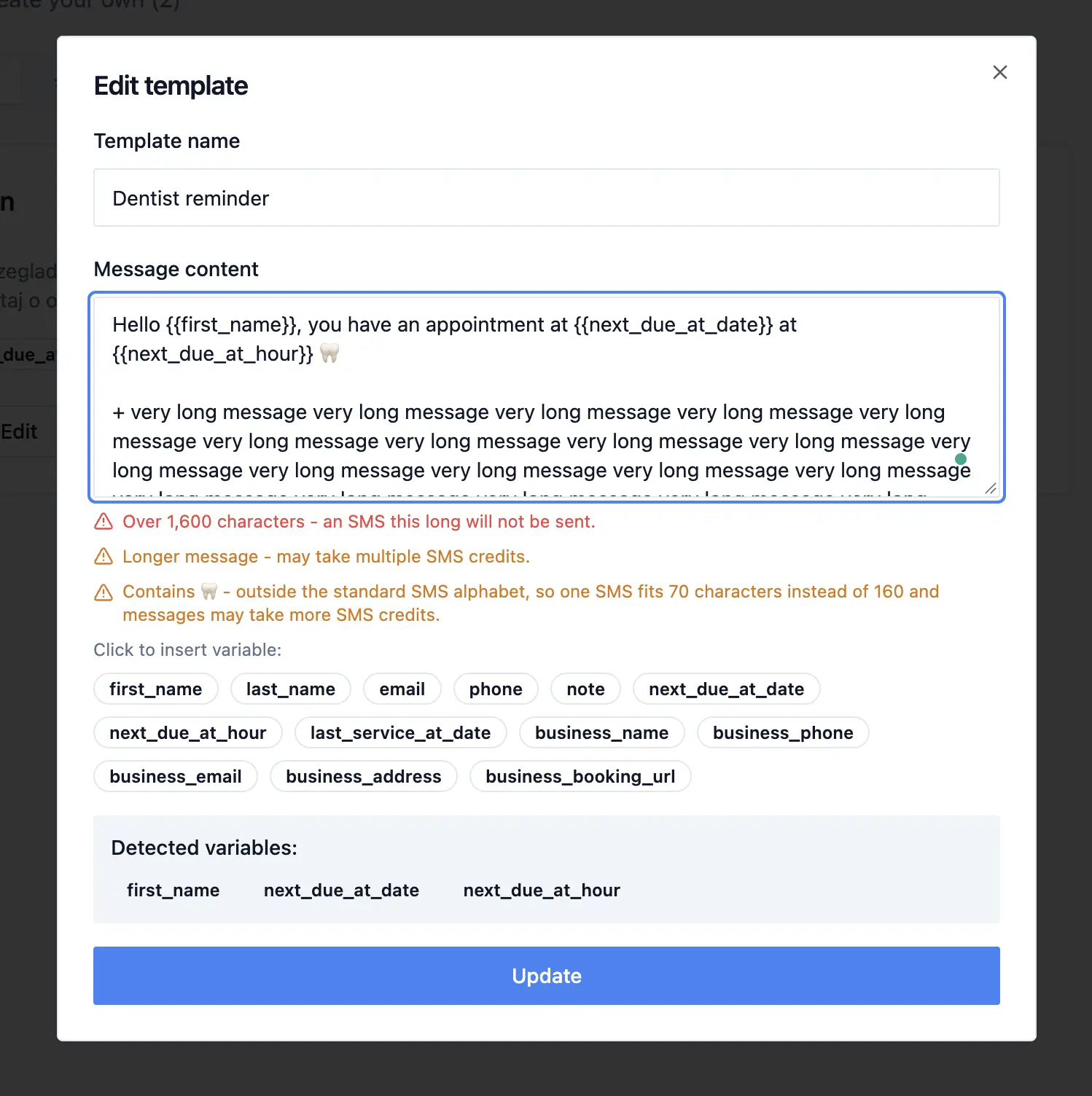
The template editor in Templates names any character outside the standard alphabet as you type, so you can replace it before saving. It should make it easier for you to spot where your message might be too long or with special characters.
We count the message the customer receives
Segments are counted on the final text, after every variable has been filled in, not on the template as you wrote it. Two consequences:
The same template can cost different amounts for different customers. A long {{note}} or a long business address can push one customer's message into a second segment while everyone else's stays at one.
A customer's name can switch their message to 70. Your template can be plain English and still a customer called Siân or Zoë gets a Unicode message, because â and ë are outside the standard alphabet.
That is why the editor warns you rather than quoting a number: the exact count only exists once the message is filled in for a specific person.
When a message counts against your allowance
Before sending, we check that the whole message fits in what you have left. If a reminder needs three SMS and you have two, it is not sent at all and nothing is used. We never send part of a message. You will see the reason on the message and get an email about it.
When our SMS provider accepts the message, its segments count. This happens even if the customer's network later refuses it (for example, a number that is no longer in use), because the provider charges for that attempt too. You can see the delivery status of each message in Messages.
If sending fails before that - you are out of SMS, or the provider rejects the request - nothing is used.
What never counts here: email reminders, and replies your customers send back.
The longest a single message can be
A single message can be up to 1,600 characters, counted after variables are filled in. A longer one is not sent and uses nothing: campaign and dashboard messages are marked failed, and the API and MCP server reject it before it is queued. The template editor warns you when a template goes over.
At that length, a plain English message is 11 segments, and a Unicode one is 24. A reminder has no reason to come anywhere near that; if yours does, it is a letter, and email is the better channel for it.
Where to see your usage
The SMS Usage card on your dashboard shows what you have used this billing period, out of your plan's allowance plus any extra packs.
In Messages, point at the SMS tag on a sent message to see how many SMS it used.
Your plan's allowance resets at the start of each billing period. SMS from extra packs carry over while your paid plan is active. Allowances per plan are on the pricing page.
How to keep a reminder to one SMS
Aim for 140 characters in the template, leaving room for longer names and dates.
Use straight apostrophes, or avoid contractions. Turn off smart quotes wherever you draft.
Skip the emoji on anything near the limit.
Use short links. A Google Business Profile short link is usually around 20 characters; a full Maps URL can be over 100. If you want - you can generate a short link (or a QR code) using Scanlo - our sister product.
If your messages need characters outside the standard alphabet, plan for 70 characters per segment.
Send yourself a real test message and check the SMS tag in Messages.
Frequently asked questions
Does the customer receive several separate texts?
No. On almost every phone the parts arrive joined as one message. Only the count behind the scenes changes.
Why did one reminder use more SMS than the others from the same campaign?
Because it was filled in with longer details, or with a name or note containing a character outside the standard alphabet. Check the exact text in Messages.
Do failed messages use my SMS?
Only if our provider had already accepted them. A message stopped before sending, for example because you were out of SMS, uses nothing.
Do replies from customers count?
No. Only messages you send count.
Related: How to write and edit message templates.