
What's New in Remindlo: October 2026
Contents
- Regular Visits: Skip One, Move One, or Change the Series
- Sign In With Google, and a Shorter Signup
- CSV Import Reads Your Dates the Right Way Round
- Know When a Character Will Cost You More
- Remindlo in Claude and ChatGPT
- Google Calendar Add-on: Clearer About Which Account Syncs
- Free SMS Template Generator: Templates That Fit
- Smaller Improvements
- What This Means for Users
Quick answer
Recent product updates in Remindlo, including sign-in with Google, regular visits you can skip, move or stop without losing the series, CSV imports that read dates the right way round, a warning for characters that make a text cost more, and Remindlo inside Claude and ChatGPT.
October was about the things that happen after the first week.
Your customers' routines change. Someone is ill and misses a clean, two clients swap days, a regular stops coming. Until this month, Remindlo's regular visits handled the first booking well and the changes after it a bit worse. Now every change to a regular visit asks the same question your own calendar asks: just this one, or this and the ones after it?
Around that sits work on getting in, and getting your data in: sign in with your Google account, set up your business in one short step, and import a spreadsheet without your dates being read back to front.
Regular Visits: Skip One, Move One, or Change the Series
If you see a customer on a fixed rhythm (a cleaner every two weeks, a personal trainer every Tuesday, an annual service), Remindlo books the next visit for you and sends its reminders. This month that rhythm became something you can change without breaking it.
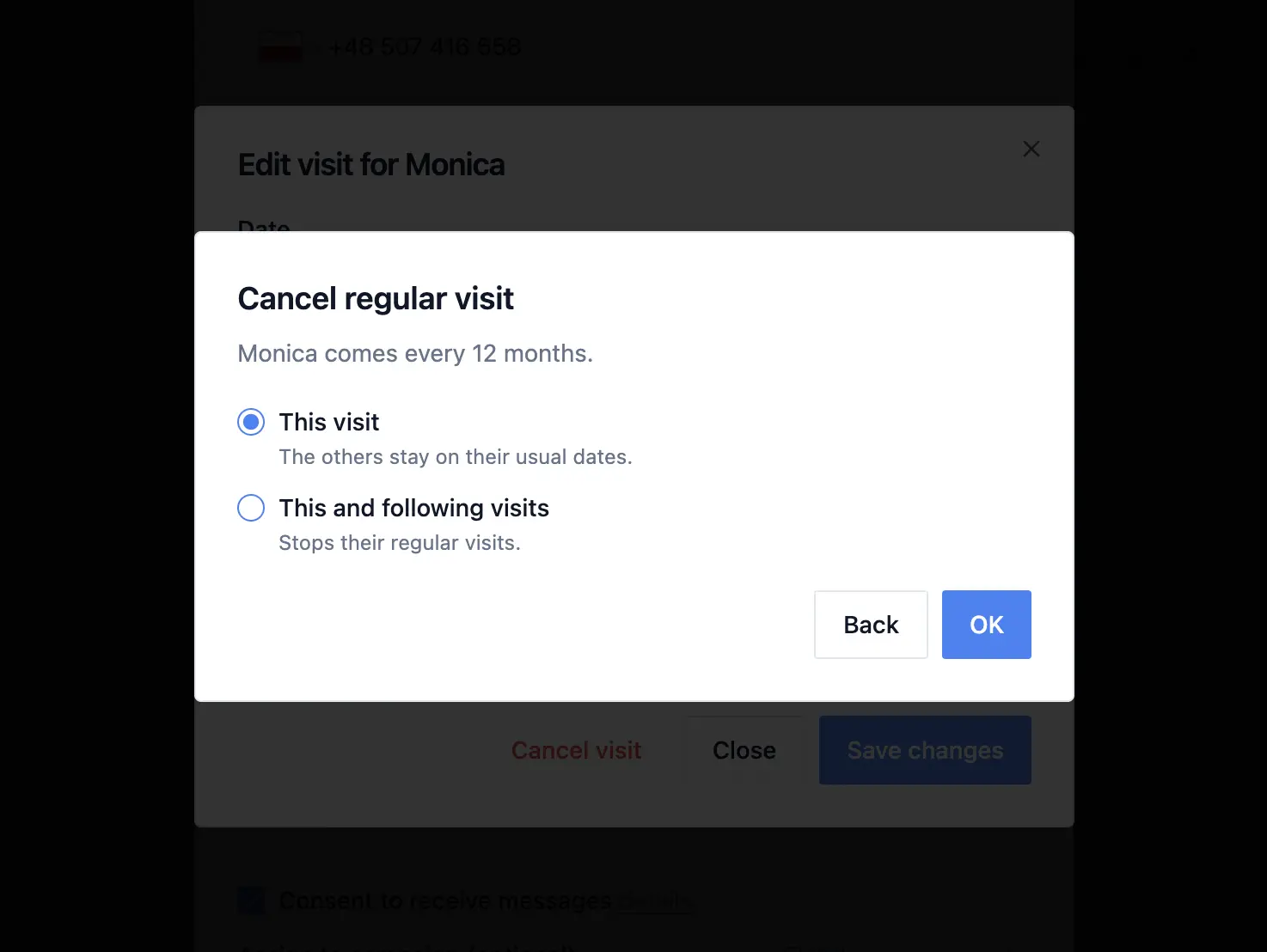
Cancel just one visit. When you cancel a regular visit, Remindlo asks: This visit, or This and following visits. Choose this visit and the customer skips that date only; the next one is booked as usual. A client who is ill for a week no longer drops out of your diary for good.
Move just one visit. Change the date of a regular visit and you get the same choice. This visit moves that one booking and leaves the rest on their usual dates. This and following visits move the rhythm, and the next visits are counted from the new date. Before this change, moving a single visit quietly shifted every visit after it.
Add an extra visit or a replacement. When you book a visit for a customer who already comes regularly, Remindlo asks whether it is an extra visit or replaces their regular one. If it replaces a visit that is already booked, Remindlo names that visit's date, so you can see exactly which one goes.
Swapping two clients' days now sticks. A cancelled regular visit used to come back the next night, so swapping two customers around meant fighting the diary. A cancelled date now stays cancelled.
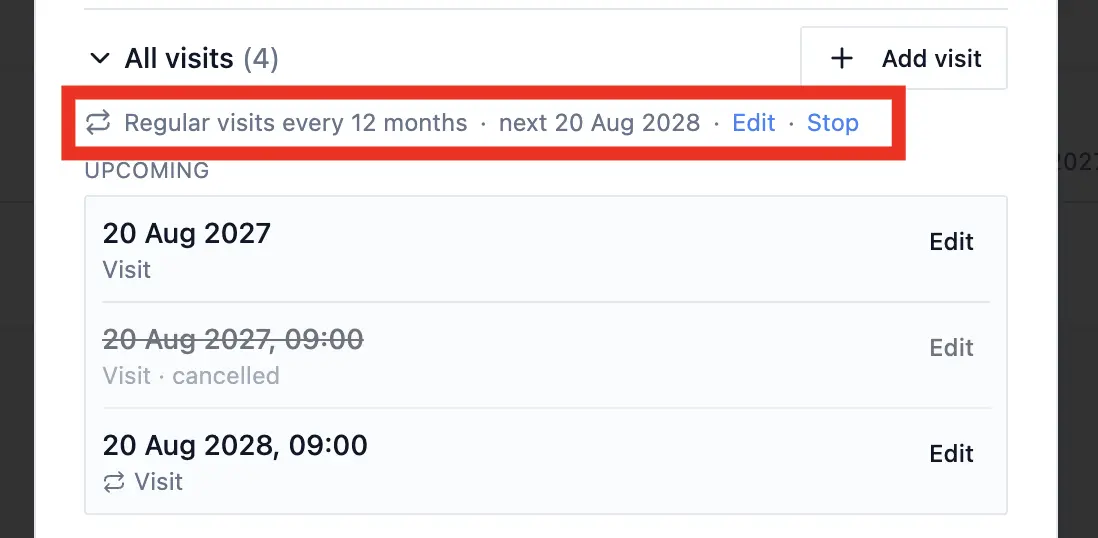
Edit or stop the rhythm from the contact. Open a customer and their visits list now shows one line: Regular visits every 2 weeks, with Edit and Stop next to it. Edit changes the interval (in days, months or years). Stop ends the series: no new visits are created, and a visit that is already booked stays as a one-off, so nothing disappears from your diary without you choosing it.
One regular rhythm per customer is deliberate. If a customer has a more complicated pattern, such as every other Monday and Thursday, book it as a repeating event in Google Calendar, Outlook or any ICS calendar: Remindlo reads each occurrence as its own visit.
Regular visits now keep their time across the clock change. Visits that crossed the end of British Summer Time on 25 October could be booked an hour early, and a visit at midnight could land on the day before. That is fixed, and we corrected visits already affected. The same fix covers other time zones, including the US change on 1 November.
Sign In With Google, and a Shorter Signup
Continue with Google. On the sign-up and log-in pages you can now use your Google account instead of a password. Sign-in happens on remindlo.co.uk from start to finish. If you already have a Remindlo account under the same Gmail or Google Workspace address, signing in with Google opens that same account: nothing is duplicated.
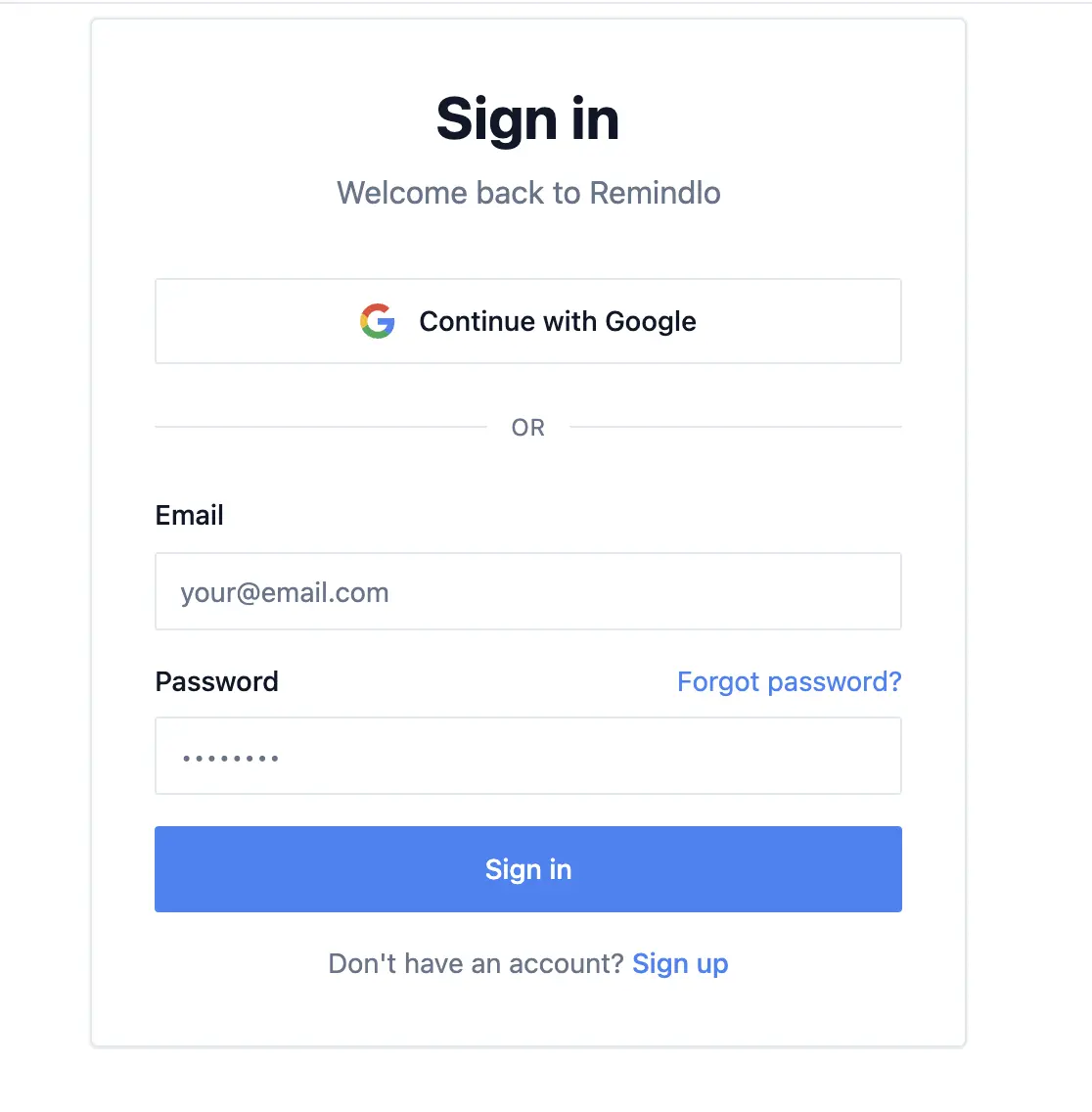
Signup is two short steps. First the account (Google, or email and a password), then three questions about your business: its name, industry and phone number. Your starter campaigns are created as soon as you save that second step, tailored to the industry you chose.
Password reset links now route to remindlo.co.uk, and a link is only used up when you actually set a new password. Some email security filters open every link in a message to check it, which used to spend a reset link before you ever clicked it. That can no longer happen.
Pressing Enter signs you in, and a password filled in by your browser or password manager is picked up properly.
New accounts also see, on the setup screen, one line on what each starter campaign does: the one before the visit cuts no-shows, the one after it looks after the customer, and the third wins back customers who have not rebooked.
CSV Import Reads Your Dates the Right Way Round
10/6/2026 is 10 June in the UK and 6 October in the US, and a spreadsheet does not say which it means. Excel also rewrites dates in the format of the computer that last saved the file, whatever the template said.
Until this month, Remindlo always read a date like that as day/month. A file saved on a US computer could import without a single error and still file every visit in the wrong month.
Remindlo now decides once for the whole column:
A date that can only be read one way settles it.
25/10/2026can only be day/month,10/25/2026can only be month/day, and one such row decides the whole file.If every date is ambiguous, the region of your workspace decides: day/month for the UK and most of the world, month/day for the US and Canada.
If a file contains both, it is not guessed at. The import tells you, so you can fix the file.
You see what was decided. After an import, the summary says how dates were read, with an example: "Visit dates read as day/month: 10/6/2026 = 10 June 2026."
Dates written as 2026-06-10 are unambiguous and are always read as they stand.
Know When a Character Will Cost You More
A standard text holds 160 characters. Use one character outside the standard SMS alphabet, such as an emoji, a curly quote pasted from Word, or some accented letters, and the whole message switches to a different encoding that holds only 70. The same reminder can then use two or three SMS credits instead of one.
The template editor now spots those characters as you type and names them, so you can swap a curly apostrophe for a straight one before it costs you anything. It is a warning, not a block: if your customers' names need the accent, keep it.
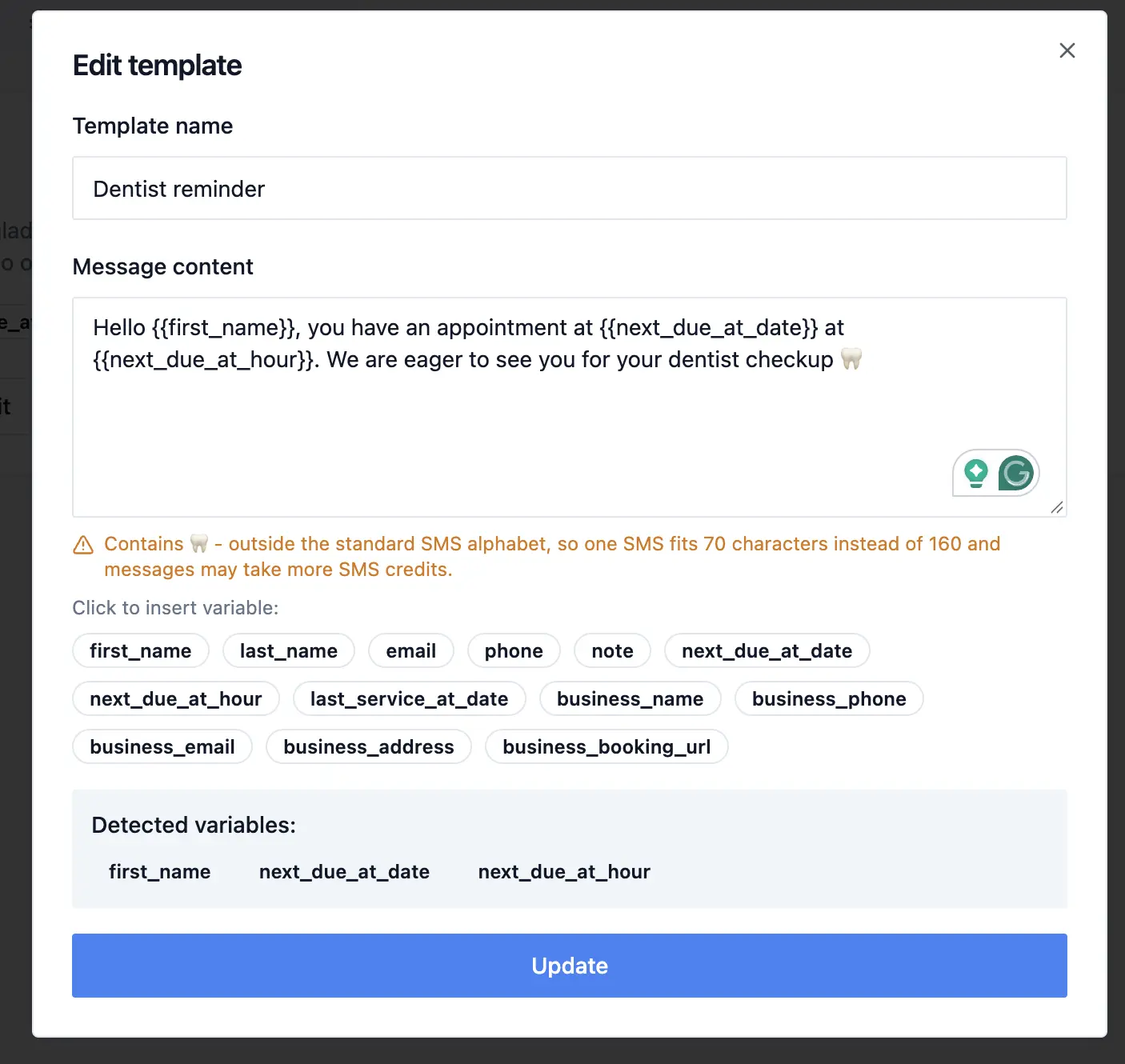
Free plan warnings make sense again. One long text can use several credits at once, so a free account could get "you've used half your SMS" and "only 2 SMS left" within the same second. Now you get one email: the one for the level you have actually reached.
Remindlo in Claude and ChatGPT
You can now manage your Remindlo contacts by chatting with Claude, Claude Code or ChatGPT: look up a customer, add one, check which campaigns are running, or send a message, in plain language.
Remindlo is listed in both directories, so you can add it from inside Claude or ChatGPT and sign in to your Remindlo account. There is no client ID or API key to copy.
You stay in control. The assistant only sees your own workspace, and every connection is listed in Dashboard > Integrations, where you can revoke it at any time.
Dates sent from an assistant or through the API are read in your time zone. Ask for a visit "on 2 November" and it is booked on 2 November where you are, not at 1 a.m. or on the evening before.
Sending messages from an assistant needs a paid plan, as it does in the dashboard.
Remindlo with Claude and ChatGPT
Remindlo SMS reminder in Claude marketplace
Remindlo SMS reminder for ChatGPT marketplace
Google Calendar Add-on: Clearer About Which Account Syncs
If you keep more than one Google account, the add-on's confirmation screen now says which account automatic sync is on for. If your workspace syncs a different Google account from the one you are using the add-on in, it tells you so, instead of reporting that everything is connected while the calendar in front of you is not being read.
Free SMS Template Generator: Templates That Fit
The free SMS template generator on our website was sometimes cutting templates off mid-word to make them fit in 160 characters, and writing placeholders like [Name] that Remindlo does not fill in. Templates now finish their sentences, stay within the standard SMS alphabet, and use the same variables as your Remindlo templates, so you can paste one straight into a campaign.
The character counter was removed from the template library at the same time. It counted a placeholder such as {{business_phone}} by the length of its name rather than of your phone number, so templates that send as a single text could look too long.
Smaller Improvements
Adding a contact by hand ticks the campaigns that add new contacts automatically, rather than simply the first campaign in your list. If you have switched automatic adding off for every campaign, none are ticked.
A dashboard left open for days now updates itself. A tab left open across several of our updates used to stop reloading and show a "new version available" card instead. It now keeps picking up each new version.
The Evidence page now lists the countries where Remindlo has a confirmed SMS delivery, measured from delivery reports, with how it was counted and what the list does not prove.
What This Means for Users
If you book regular visits, open one of those customers: the new line at the top of their visits list shows the rhythm, and Edit and Stop are right next to it. The next time a client misses a week, cancel just that visit.
If you import customers from a spreadsheet, read the line under the import summary that says how dates were read. It takes a second and catches a whole file filed in the wrong month.
And if you already use Claude or ChatGPT at work, add Remindlo from its directory and try asking it who is booked in this week.