The Reminder You Never Sent: Four Reasons Customers Do Not Get Yours
 by Peter Bednarek, Founder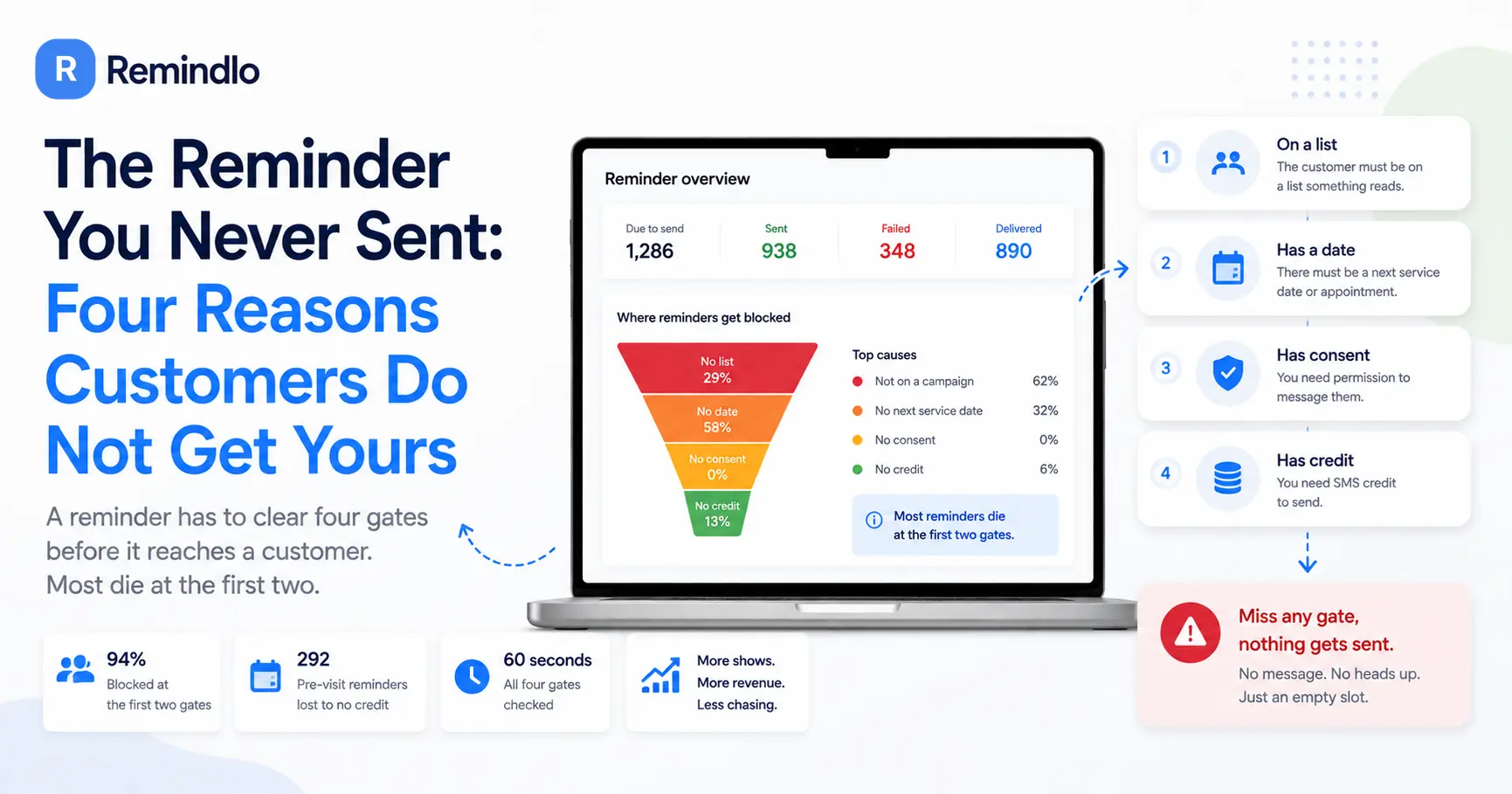
Contents
Quick answer
A reminder has to clear four gates before a customer sees it: the customer has to sit on a list something reads, there has to be a date to count back from, you need permission to message them, and you need the credit to send. Miss any one and nothing happens, silently. Most reminders that never arrive die at the first two gates, and the business never finds out.
Last week we published what happened when we read 72 reminder texts that businesses wrote themselves: thirty of them gave the customer nowhere to go - no number, no link, no email. That post was about what the message says.
This one is about the quieter problem underneath it. A reminder that never sends has a response rate of zero, however well written it is, and unlike a badly written one it leaves no trace. Nobody complains about a text they did not receive. You find out at 9am when the slot is empty.
So we went back to the database and asked ourselves a different question: of the reminders that were supposed to go out, which ones did not, and why.
The four gates
Every reminder system, ours or anyone else's, applies the same four tests before a message leaves. Written out, they are obvious. Left implicit, each one is a silent failure.
Gate 1: the customer is on a list that something actually reads. A spreadsheet is not a schedule. Neither is a customer sitting in your system but not attached to any automation. This is the gate that most people assume they have passed because they did the work of building the list.
Gate 2: there is a date to count back from. "Three days before" needs a before. No next service date, no appointment, no last-visit date means no anchor, and a reminder with no anchor has no day on which to fire.
Gate 3: you have permission. Consent to receive messages is a legal requirement and, sensibly, a hard block in any decent system.
Gate 4: you have the credit. The one everybody thinks of first, and the rarest cause in practice.
The order matters, because the failures cluster at the top.
Where reminders actually die
We audited 183 recent accounts as they were in their first week, and asked what would have happened if a reminder had been due.
State of the account | Share |
|---|---|
No customers loaded at all | 29% |
Customers loaded, but nothing that could be scheduled | 58% |
At least one reminder that could actually fire | 13% |
Nearly six in ten had done the hard part - got their customers into a system - and then stopped one step short of the automation doing anything. Of those, the split was:
What was missing | Share of blocked accounts |
|---|---|
Nobody attached to a campaign (gate 1) | 62% |
Attached, but no next service date anywhere (gate 2) | 32% |
Consent (gate 3) | none |
No single identifiable cause | 6% |
Consent, the gate people worry about, blocked none of them. Gates 1 and 2 blocked 94%.
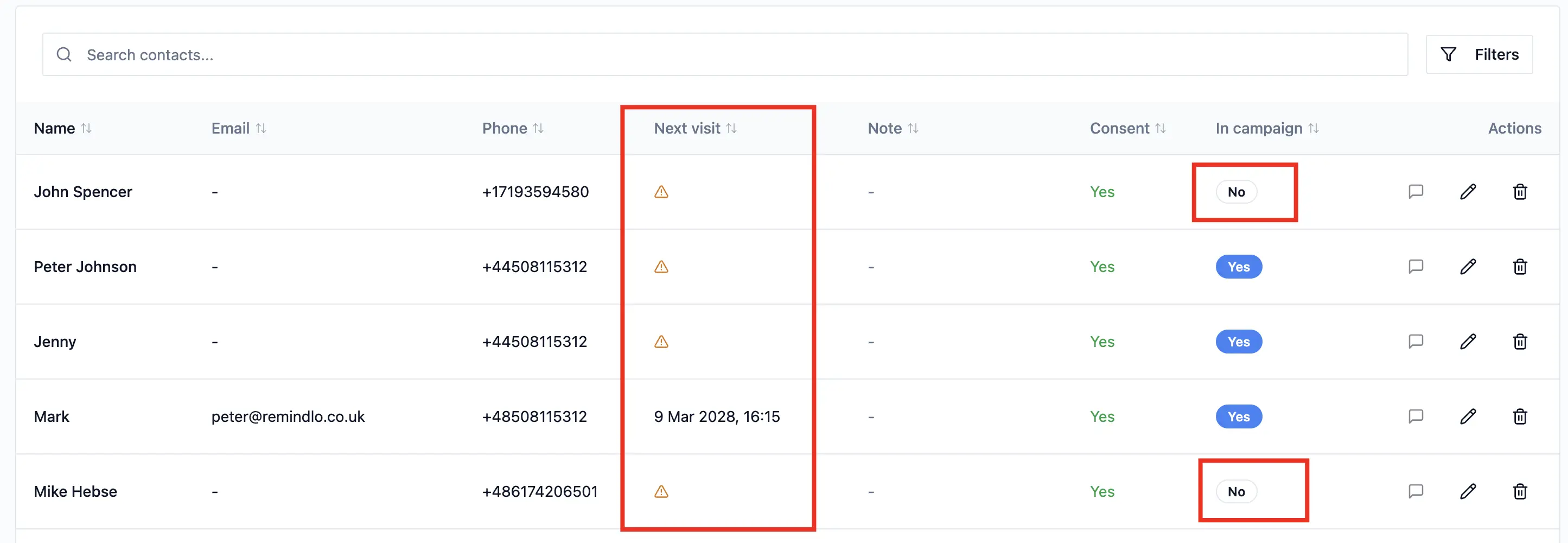
The reason this goes unnoticed for months is that both failures look exactly like success from the outside. The customer list is there. The campaign says "running". The templates are written. Nothing on the screen is red, because nothing is wrong - there is just nothing scheduled, and an empty schedule is indistinguishable from a quiet week.
Gate 4, and why running out is worse than it sounds
The credit wall is rarer, but it behaves in a way that catches people out.
In our recent data, 348 reminders have been refused for lack of credit, aimed at 164 different customers. On a typical blocked day two reminders were refused; the worst single day cost 20.
Here is the part that matters more than the total. 292 of those 348 were reminders due before a visit. A before-the-visit reminder carries a deadline inside it: once the appointment date passes, the message is not late, it is gone. Topping up two days later recovers nothing, because there is no longer anything to remind anyone about.
The other 56 were after-the-visit messages - thank-yous, review requests, win-backs. Those survive. Their anchor is a visit that already happened, so once credit is available, they go out late and still work.
So a credit wall is not one problem. It is a permanent loss on the pre-visit side and a delay on the post-visit side, and only the first one costs you an appointment.
What the missing messages look like
We cannot print real blocked messages - they belong to the businesses that wrote them and they carry their customers' names. But the shape is consistent. These are reconstructions, with invented businesses and numbers from the ranges Ofcom reserves for drama:
Hi Sam, your MOT at Hillside Motors is due 04/09. Book in: call 01632 960123.
Never sent. The customer forgets, drives on an expired MOT, and books wherever they see first when they remember.
Hi Priya, you are booked in with Ridge Dental on 22/08 at 2pm. Need to move it? Call 01632 960455.
Never sent. She had a clash, could not remember whether it was the 22nd, and did not turn up. The chair sat empty for half an hour.
Hi Tom, it has been six months since your last cut at Fold Barbers. Fancy the same slot? Book: 01632 960712.
Never sent. Nothing dramatic happens. He just gradually stops being a customer.
The first two are worth an appointment each and they expire. The third is worth a returning customer and it does not expire - it simply never gets sent, because nobody ever notices the absence of a message.
The 60-second check
This works with whatever you use - our software, someone else's, or a calendar and good intentions.
Pick one real customer who should get a reminder in the next fortnight. A specific person, not a hypothetical.
Find the screen that shows what is scheduled, not the screen that shows your customer list. If your system cannot show you an upcoming message for that named person, on a named date, treat that as a failure and not as a missing feature.
If they are not on it, check gate 1, then gate 2. Are they attached to an automation? Do they have a date attached to them? In our data those two account for 94% of the blockages.
Check the message would clear gate 4. Look at your remaining credit and multiply your upcoming reminders by two, because a single visit usually takes more than one message.
Send yourself one, to your own phone. Read it as a customer. This is the step almost nobody does and it catches both problems at once: whether it arrives at all, and whether it tells the customer what to do next.
If you run all five and find your reminders are firing correctly, that is 60 seconds well spent. If you do not, you have just found out on a Tuesday afternoon rather than on the morning of an empty appointment.
One customer is not one message
The most common miscalculation we see at gate 4 is treating a customer as a message.
A full lifecycle for one visit is roughly: two or three reminders before the appointment, a thank-you or review request after it, and a win-back some months later if they go quiet. That is around five messages per customer per cycle. Ten free messages a month is not ten customers - it is two.
That arithmetic is why the credit wall arrives sooner than people expect, and why it usually arrives on the pre-visit messages, which are the ones that expire. If you are near your limit, the sequence to protect is the one with the deadline in it.
More on how the three phases fit together in The Three SMS Touchpoints Every Service Business Should Automate, and on the mechanics of setting each one up in our campaign setup guide.
What your software should be telling you
None of the above should be your job to discover.
We changed our own alerts this month for exactly that reason. If nothing in your account is scheduled, the email now says what that costs ("You have added 12 customers. None of them will get a reminder") and points at the single screen that fixes it, rather than describing a feature. If a message is refused for credit, the email leads with the number of customers about to go unreminded, not with your balance - because "0 SMS remaining" is a fact about our accounting, and "six reminders will not reach your customers" is a fact about your business.
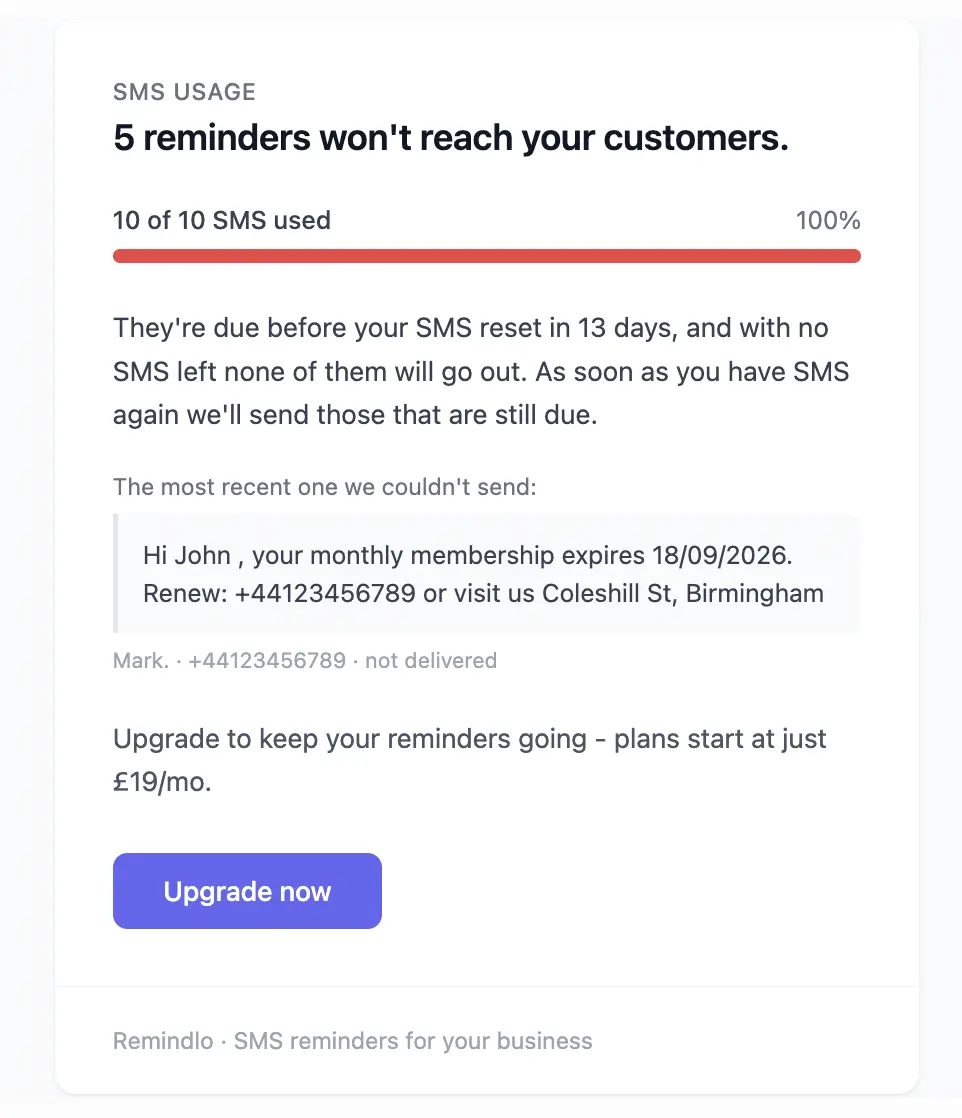
The general test, which you can apply to any tool you pay for: when something silently stops working, does it tell you, and does it tell you what it costs? A system that only reports its own status is leaving the interesting half of the sentence to you.
Frequently Asked Questions
Why did my customer not get their reminder?
In order of likelihood: they are not attached to an automation, they have no date for a reminder to count back from, they are not marked as consenting to messages, or you have run out of sending credit. In our data the first two account for 94% of blocked accounts. Check them in that order, on the screen that shows what is scheduled rather than the one that shows your customer list.
What happens to reminders when I run out of SMS credit?
They are refused rather than queued forever. Messages that fire after a visit - thank-yous, review requests, win-backs - keep their place and go out once you have credit again. Reminders due before an appointment expire with the appointment: 292 of the 348 refused reminders in our data were of that kind, so topping up after the date has passed recovers nothing.
How do I know my reminders are working without waiting for a no-show?
Pick a named customer with a visit in the next fortnight and find them on the schedule, with a date. If your system cannot show you that, you do not have a scheduling problem to fix later, you have one now. Then send one message to your own phone and read it as a customer.
How many messages does one customer actually use?
Around five over a full cycle: two or three before the visit, one after it, and a win-back if they go quiet. Budget by messages, not by customers, or the wall arrives roughly two and a half times sooner than you planned for.
Does marketing consent block service reminders?
In the accounts we audited, consent blocked none of them, but the rule is worth knowing rather than guessing: a reminder about an appointment the customer booked is a service message, while a win-back to somebody who has not been in for six months is marketing. Keep the consent flag accurate and let the system apply the distinction, rather than deciding message by message.
My reminders send, but customers still do not turn up. Now what?
That is the other failure, and it is a copy problem rather than a delivery one. Of 72 reminder texts we read, 30 gave the customer no way to reply, cancel or rebook - so the customer who could not make it had no cheap way to tell you. The fix is one line.
The Bottom Line
The reminder that costs you the most is not the badly written one. It is the one that never left, because it fails without a symptom: no bounce, no complaint, no red icon, just a quieter week than you expected.
Four gates, in this order: on a list something reads, a date to count from, permission, credit. Run the 60-second check on one real customer today. Most people discover they are one field short of an automation they thought had been running for months.
👉 Start with 10 free SMS reminders - no credit card required 👈