
How Remindlo Reads Customer Names and Phone Numbers From Your Calendar
Where Remindlo looks for a mobile number and a customer name inside a synced calendar entry, and what it refuses to guess.
Contents
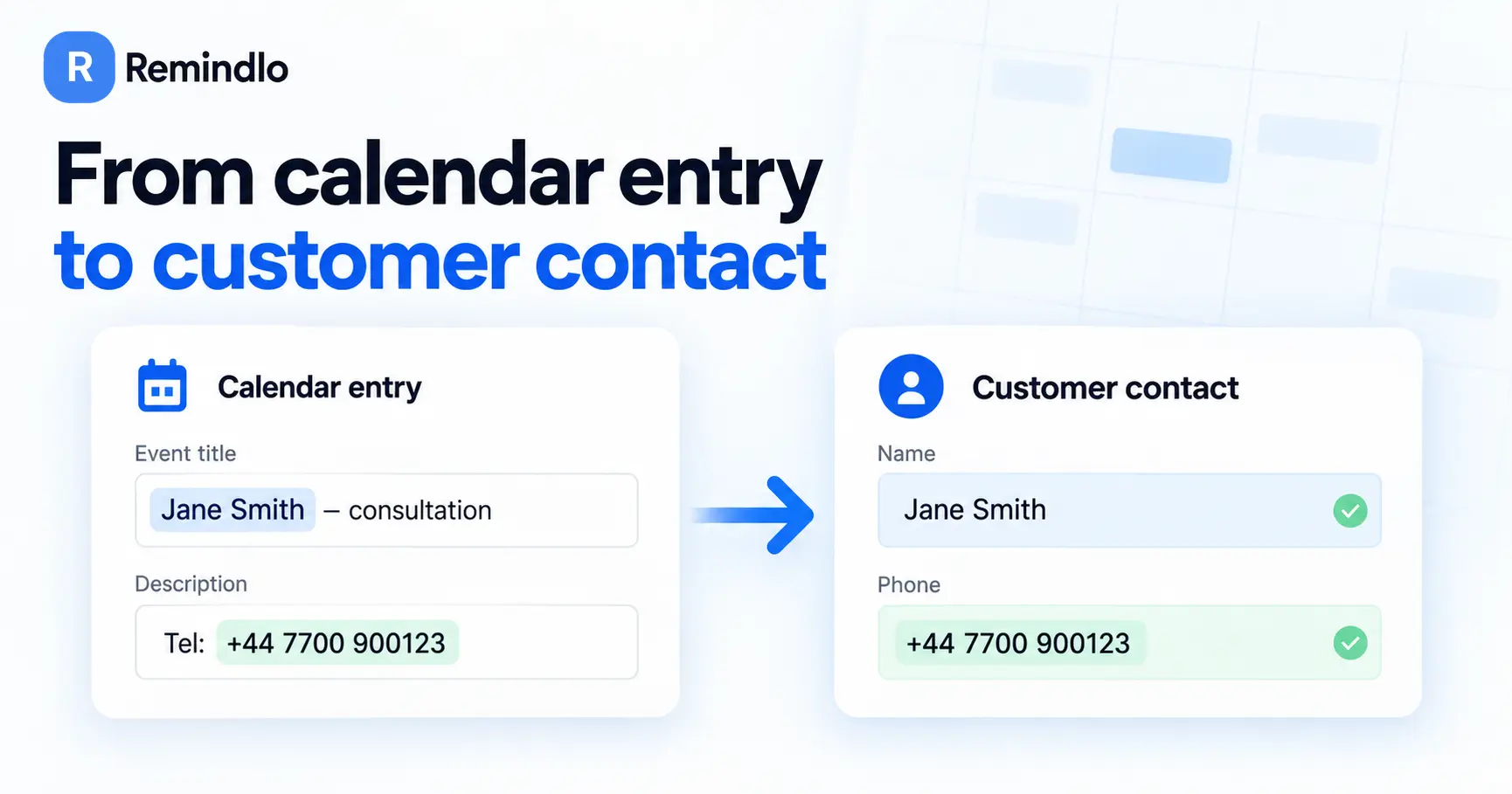
When you connect a calendar to Remindlo (Google, Outlook, iCloud, or another one), every booking has to answer two questions before a reminder can ever be sent: how do we reach this customer, and what do we call them. The appointment time comes straight off the event. The phone number and the name usually do not - they are somewhere inside an entry you wrote for yourself, in your own shorthand.
This article explains how Remindlo reads that entry: where it looks, in what order, what it deliberately refuses to use, and what happens when it cannot find an answer. Nothing here needs setting up. It is how calendar sync has always worked, and knowing the rules makes it easy to get more out of it without changing how you write your diary.
The whole idea of the calendar sync feature is to help you work exactly as you used to, and not add any overhead to your already busy schedule. It's our job to extract those meetings out of your calendar and convert them into customers and their reminders.
Where the phone number is read from
Remindlo looks in four places, in this order, and stops at the first one that gives a usable number:
The Remindlo panel in your calendar. If you opened the Remindlo side panel on an event and typed a number into it, that number is used. Nothing overrules it.
The event description - your notes on the booking.
The event title.
The location field (with a stricter rule than the other two).
The order reflects how much each one can be trusted. A number you typed into the panel is an answer. A number in your notes or your title is you writing a number down. The location field is meant to hold an address, so it carries join links, meeting IDs and room numbers far more often than it carries mobiles - which is why a plain run of digits there is only accepted when the whole field is that number and nothing else.
How Remindlo decides a run of digits is a phone number
Calendar entries are full of numbers that are not phone numbers. Within a single field, Remindlo grades every candidate it finds there and keeps the strongest one. From strongest to weakest:
An international number, written with a
+or a leading00. You have said explicitly what this is.A labelled number - anything following Phone:, Tel:, Mobile: or Contact:.
A number that fits the shape of the numbering plan for your country.
A number with a leading zero, the way a UK mobile is normally written.
A bare run of digits with nothing else to go on.
So an entry reading "Invoice 123456789 - call 07700 900123 before Friday" picks the mobile, not the invoice number, because the mobile carries a leading zero and the invoice does not. A lone run of digits is still accepted when nothing in the entry competes with it, which is what makes this work for countries where mobiles have no leading zero at all. The one exception is the event title in the US and Canada, covered below.
The grading settles which number wins inside one field. It does not reach across them: the four places above are searched in order and the first one holding a usable number ends the search. So a plain number in your notes is the one used even when the title carries one written as +44…, because the notes were read first and already answered the question.
A label is the strongest thing you can add without rewriting the number. It beats every other reading of a local number, and it gets one accepted where Remindlo would otherwise pass it over: a number shorter than the usual length, one sitting mid-sentence in the location field, or one in a booking that also carries a video-call link. Two things it does not do. It does not outrank a number written in full international form in the same field, because that is already you saying what the number is, and it cannot rescue a number that could not exist in your country, or one that cannot receive a text, such as a landline. So for a genuinely ambiguous entry, put Tel: in front of the number you mean, and write that number in full international form if you want it to win outright.
What Remindlo deliberately ignores
Some numbers look perfectly dialable and still belong to nobody you want to text. These are stripped out before the entry is read at all:
Anything inside a web address. A booking reference sitting in a URL is not a customer's mobile.
Conference dial-in numbers. When an entry was generated by Zoom, Teams, Google Meet, Webex and the like, the international numbers in it are the provider's dial-in bridge. They are real numbers, and texting one reaches a conferencing company rather than your customer.
One-tap dial strings, the long sequences with commas and a hash that join you to a meeting.
Meeting IDs, conference IDs, passcodes, PINs and access codes, in English and in several other languages.
Email addresses.
Numbers that could not exist. A run of digits longer than any real number in your country is refused, however convincing it looks, and so is one that no phone company has ever issued, such as a US number with an area code that is not in use.
Landlines, freephone and premium-rate numbers. They are real, but none of them can receive a text message. Remindlo skips them and keeps looking, so an entry reading "Home 0161 496 0000, mobile 07700 900123" uses the mobile.
Plain ten-digit numbers in the title, in the US and Canada. Ten digits is the shape of every North American phone number, and also of student IDs, account numbers and case numbers, which often sit in a title in exactly that form. In the title, a number is only read when it is written the way people write phone numbers, such as 201-555-0123, (201) 555-0123 or +1 201 555 0123, or when it has a Tel: label. The description is not affected.
A number you labelled yourself, or one in the event title, still gets through in a video-call invitation. The rule is aimed at the block of dial-in numbers a conferencing tool prints into the body of an invitation, and no tool writes that into a title.
Numbers written without a country code
Most people write a local number in their diary: 07700 900123, not +44 7700 900123. To text it, Remindlo has to know which country it belongs to.
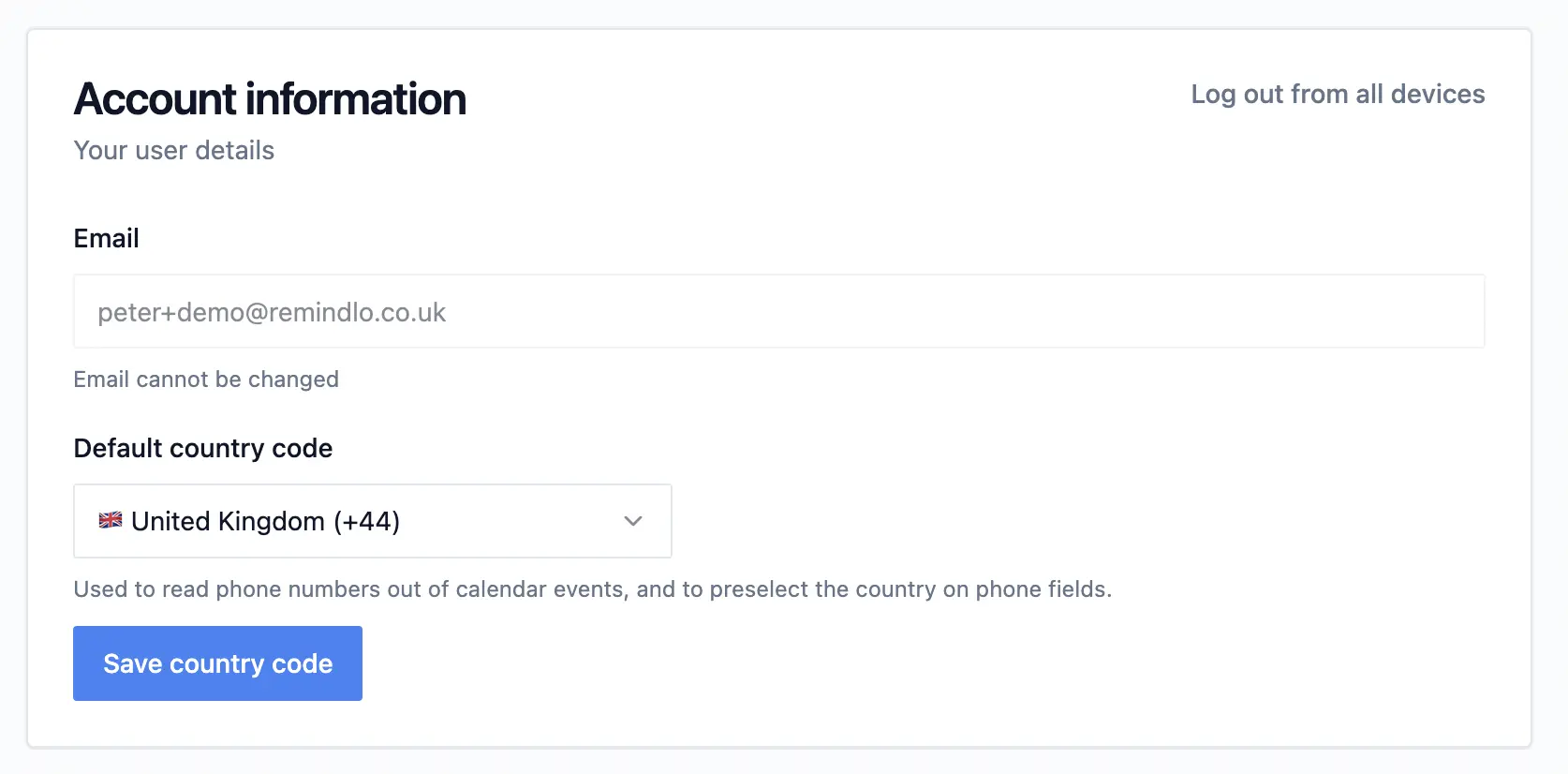
That comes from Default country code in Settings. Set it once and every local number in your calendar can be read. Leave it unset and only numbers written in full international form will be picked up, so bookings quietly go by without a contact being created.
It also handles the shape you get from pasting out of a booking system, where the country code arrives without its plus sign.
When there is no number at all
If an entry carries no usable phone number and no guest email address, Remindlo creates nothing. No contact, no half-finished record, nothing to tidy up later. A guest email on its own is enough to create a contact, which is how email reminders reach people who never left a number.
Because nothing is stored, nothing is stuck either: add a number to the entry, or type one into the Remindlo panel, and the next sync picks the booking up as though it had always been there.
Where the customer's name is read from
The same idea, with four sources in order of how much they can be trusted:
The Remindlo panel. First and last name typed there are kept exactly as you split them.
The guest on the invitation. Whoever booked has already told the calendar who the customer is.
The event title, but only when it reads like a name.
AI name recognition, when the title is all there is and it does not read like a name.
A name from the guest list
Remindlo takes the first guest who is not you, is not a meeting room, and has not declined. The name and the email address are always read off the same guest, so a two-person booking can never pair one person's name with another's email address. The phone number is not part of that pairing: it is read from the entry's own text, never from the guest list.
Address books are untidy, so that name is cleaned up before it is used:
An honorific in front of the name is dropped, so Mrs Rachel Bitmead becomes Rachel Bitmead.
A name in block capitals or all lowercase is set to normal capitals. A name that already has capitals in the right places is left exactly as it is, so McDonald and van der Berg survive.
Smith, Jane is flipped to Jane Smith.
A guest whose display name is just their email address is ignored, and the title gets its turn instead.
Because the calendar is the record here, a wrong guest name is corrected in the calendar or in the Remindlo panel rather than only on the contact. See What is never overwritten below.
A name from the title
A title is a note to yourself about a job. It is a customer's name only by coincidence, so Remindlo is careful with it.
Before anything else, the phone number comes out of the title. Without that, "Mike Swan 07700900000" would leave a surname of "Swan 07700900000", and that surname would be printed into every message that used it. Common job words such as appointment, meeting and consultation are removed too.
What is left is judged on its first word only, because that is the word that becomes the first name and lands straight after "Hi". The title produces no name when that first word:
contains a digit
ends in a colon, as in Canceled:
does not start with a letter, such as an emoji, a hash or a bracket
is a booking or status word - confirm, cancelled, booking, new, client, enquiry and similar, in several languages
is an honorific such as Mr or Mrs
Blanking the name here is not the end of the road. It is exactly how the entry reaches AI name recognition, which is much better at this than any rule can be.
When the title is not a name: AI name recognition
Most real bookings hold the customer's name somewhere in the title, buried behind a code you use, or inside brackets a booking tool added: "FGA reminder:Andrew White", "New Client Enquiry (Tab Khan)", "HV Pamela Abbott - annual check". No rule about first words can dig those out. Reading the whole line can.
AI name recognition is given the title and your business context - your business name, trade, city, time zone and language - and asked one question: who is the customer here? It follows four rules that matter more than the cleverness:
It never invents. Every character of the name it returns has to already appear in your entry. A name that is not in your calendar cannot come out of this.
The customer, not you. Knowing your business name is what lets it pick the client rather than the member of staff in an entry that names both.
When it cannot tell, it says nothing. Two people in one entry with no way to tell who booked means no name at all. A wrong name is worse than no name.
Not everything is a person. "Rent due" or "Room 2 blocked" produces no name, and that is a correct answer rather than a failure.
This runs a couple of minutes behind the calendar sync, so a booking that arrives at ten past the hour normally has its name settled before you have finished looking at it.
A reminder with no name still reads properly
When no name can be found, the greeting closes up rather than leaving a gap. Hi {{first_name}}, is sent as Hi, - not Hi ,. You can write your templates with names in them without worrying about the bookings that have none.
What is never overwritten
A name read out of a title is the weakest thing in the system, and it is never allowed to overwrite something better. Once a contact's name came from the Remindlo panel, from a guest on an invitation, from an import, from you typing it, or from AI name recognition, a later title cannot replace it.
Editing a contact is also how you have the final word. Change the name on a contact and it is marked as yours: AI name recognition will not look at that customer again.
What you see in your contact list
Nothing here happens quietly. In Contacts:
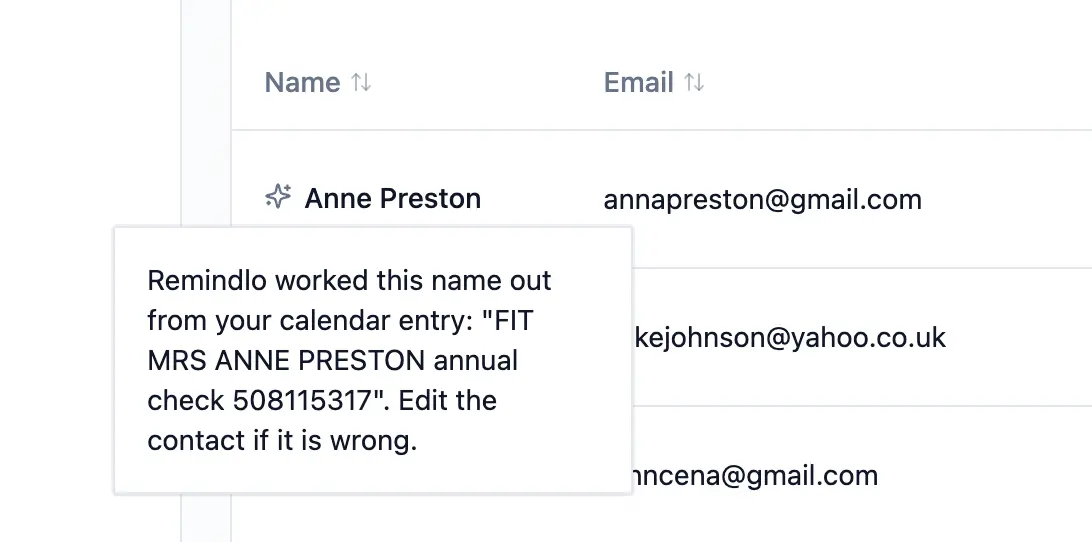
A name worked out by AI name recognition carries a small sparkle marker. Open it and you see the exact calendar entry the name was read from, so you can judge it for yourself.
A contact with no name shows the calendar entry instead, with a calendar marker beside it. That way you still recognise your customer in the list, while the marker makes it clear that this is an entry rather than a name - and that reminders to them will open with a plain "Hi,".
If either looks wrong, edit the contact. For a name you typed yourself, one read out of a title, or one worked out by AI name recognition, that is the whole correction process.
A name that came from a guest on the invitation is the exception. Your calendar holds its own record of that person, and Remindlo applies it again the next time the booking is edited and synced. Editing the contact fixes the name straight away, so do it if a reminder is due shortly, but correct it at the source as well: fix the guest entry in your calendar or address book, or open the Remindlo panel on that event and type the first and last name there, which overrules every other source for good.
Getting better results without changing how you work
You do not have to rewrite your diary. Five things help:
Set your default country code in Settings if you write local numbers. This is the single biggest one.
Add the customer as a guest where your booking tool can do it. A guest gives a name and an email address that need no guessing at all.
Label an ambiguous number with Tel: when an entry holds a reference number as well. In the US and Canada, write a number in the title with dashes or brackets, as you normally would.
Use the Remindlo panel for the one-off booking where the details are not in the entry. Anything typed there wins.
Keep your codes and shorthand. They are there because they are useful to you, and they are read around rather than printed at your customer.
Frequently Asked Questions
Why has a booking not turned into a contact?
Almost always because the entry held no phone number and no guest email, or because a local number could not be read without a default country code. Check Settings first, then add a number to the entry or to the Remindlo panel. The next sync picks it up. If the entry does hold a number, check that it is a mobile: a landline or freephone number is skipped because it cannot receive a text.
A number is in my calendar entry but was not used. Why?
Either it cannot receive a text (a landline, a freephone or premium-rate line, or a number no phone company has issued), or, in the US and Canada, it is a plain ten-digit run in the title with no dashes, brackets or Tel: label. Write it as 201-555-0123, or type it into the Remindlo panel, and the next sync picks it up.
A video call was booked and the contact is wrong. What happened?
A dial-in bridge saved as a customer is exactly what the conferencing rules above exist to stop. Two things are worth knowing. Contacts created before those rules were in place are not cleaned up retrospectively, so an old one may still be sitting in your list - delete it. And a number in the event title, or one behind a Tel: label, is always treated as yours rather than the provider's, so check there if a new booking still produces the wrong contact.
Could a reminder go out addressed to the wrong person?
A name can only come from the entry itself, and where an entry names more than one person without a clear customer, no name is used at all. The name and the email address always come from the same guest, so those two cannot be mismatched. The phone number is a separate reading, taken from the entry's own text rather than from the guest list, so a booking that names one person and writes somebody else's mobile in the notes will put the two together. Where an entry involves more than one person, type the customer's number into the Remindlo panel.
Is my customer data sent to an AI?
Only the title of the calendar entry, together with your business name, trade, city, time zone and language so the title can be read in context. The title goes exactly as you wrote it, so anything you typed into it, such as a phone number, goes with it. The rest of the event, including its description, guests and scheduled time, and your message content, is never sent. Processing happens in the European Union.
I corrected a name. Will the calendar overwrite it again?
Not from a title, and never by AI name recognition. The one case where a synced name keeps being applied is a customer who is a guest on the invitation: the calendar holds a name for them, and it is applied again the next time that booking is edited and synced. Change it at the source, or use the Remindlo panel on that event.
Does this work with Outlook and iCloud as well as Google Calendar?
Yes. All three calendar sources are read the same way, by the same rules. See Calendar SMS reminders for connecting each one.
Which plans include this?
All of them, including the free plan, from the first calendar you connect. There is nothing to switch on.
If you have any questions about that feature - reach out to us at contact@remindlo.co.uk