What's New in Remindlo: September 2026
Recent product updates in Remindlo, including AI name recognition that finds your customer's name in a calendar entry, delivery receipts on every text, a direct Outlook and Microsoft 365 connection, a dashboard that tells you what needs attention, and top-up SMS that carry over at renewal.
Contents
- AI Name Recognition: The Right Name, From Any Calendar Entry
- Know Whether Your Text Actually Arrived
- Numbers That Cannot Take a Text Are Caught First
- Reminder Dates Are Right in Every Time Zone
- Outlook and Microsoft 365: Sign In and You Are Connected
- Several Google and Microsoft Accounts in One Workspace
- Your Dashboard Now Tells You What Needs Attention
- Remindlo Reads Your Calendar More Accurately
- Google Calendar Add-on: Works Before You Connect Your Calendar
- SMS Top-ups: Nothing Is Lost at Renewal
- A Smoother Start for New Accounts
- Every Number We Publish Now Has a Source
- Smaller Improvements
- What This Means for Users
- Our previous changelogs
September was about what your customer actually receives.
Two of this month's changes are things you would only notice by reading your own outgoing messages closely: whether the name at the top is really your customer's name, and whether the text arrived at all. Both are now handled properly. Around them sits a run of work on the same theme: dates that are right in every time zone, numbers that cannot take a text caught before you pay for one, and a dashboard that tells you plainly whether your reminders are going to go out.
Outlook and Microsoft 365 users also get the thing they have asked for most: sign in with Microsoft, and your calendar is connected.
AI Name Recognition: The Right Name, From Any Calendar Entry
You write your calendar entries for yourself. FIT MRS ANNE PRESTON annual check makes perfect sense at eight in the morning with the day ahead of you. It makes no sense at all at the top of a text message, and until this month that is roughly what some reminders looked like.
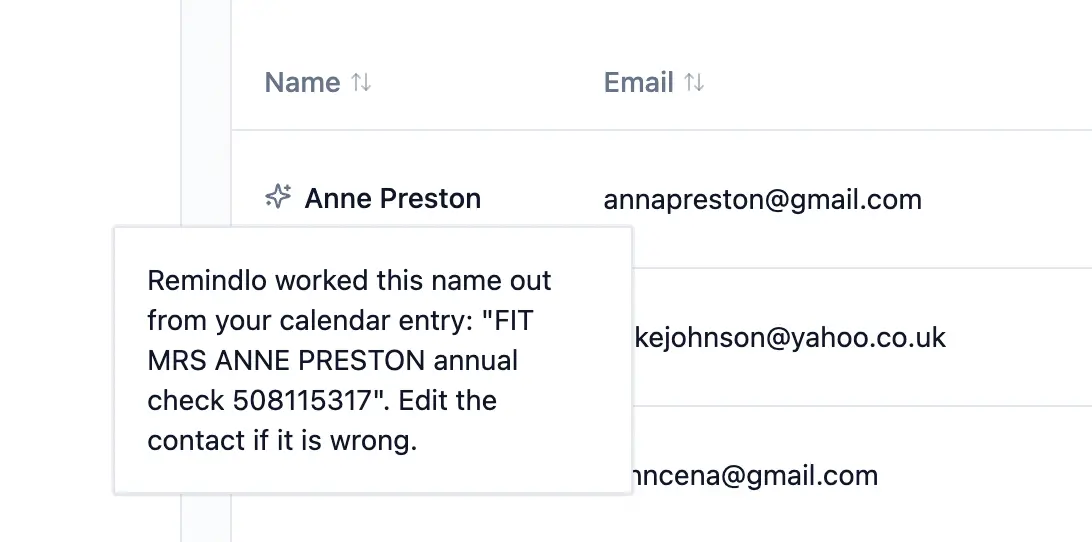
Remindlo now reads the entry the way a person would, finds the customer in it, and uses that name. Booking codes in front, honorifics, the job, a price, a room number, a name in brackets or buried in an address: all understood, with no list to configure and nothing for you to change about how you write.
It never invents a name. Every name that reaches a customer has to already be present in the entry you wrote. That is a mechanical check, not a matter of the AI behaving itself: a name that is not in your entry cannot come out of it.
When it cannot tell, it says nothing. If an entry names two people, is an address, or is not a person at all, no name is used. The message is then written without one, and the greeting closes up so it reads normally: "Hi, just a reminder..." rather than "Hi ," (with a space in it).
You can see what it read. Every name worked out this way carries a small marker in your contacts list. Open it and you see the exact calendar entry the name came from. If it read something differently from how you meant it, edit the contact, and Remindlo leaves that name alone from then on.
Names you gave us are never touched. A name you typed, imported from a spreadsheet, or that came from a guest on the invitation is an answer a person has already given. Name recognition only looks at entries where the name would otherwise be whatever the title happened to say.
This is in every plan, including the free one, from your first calendar sync. There is nothing to switch on.
It applies to appointments as they sync from now on. If your existing customer list carries names that came from event titles, get in touch and we will look at tidying those too.
Two smaller fixes shipped alongside it. Phone numbers typed into an event title no longer end up as part of the customer's name, and when a contact has no first name, a template that starts Hi {{first_name}}, now renders Hi, instead of Hi ,. Nothing changes for a message where every field is filled.
How name recognition works | Technical description of that feature
Know Whether Your Text Actually Arrived
Until this month, "sent" in Remindlo meant that the message had been handed to the mobile network. It did not mean your customer's phone had received it, and a text the network turned away still read as sent.
Remindlo now records what the network reports back about every text: delivered, or not delivered. A reminder that never reached the customer no longer looks like one that did.
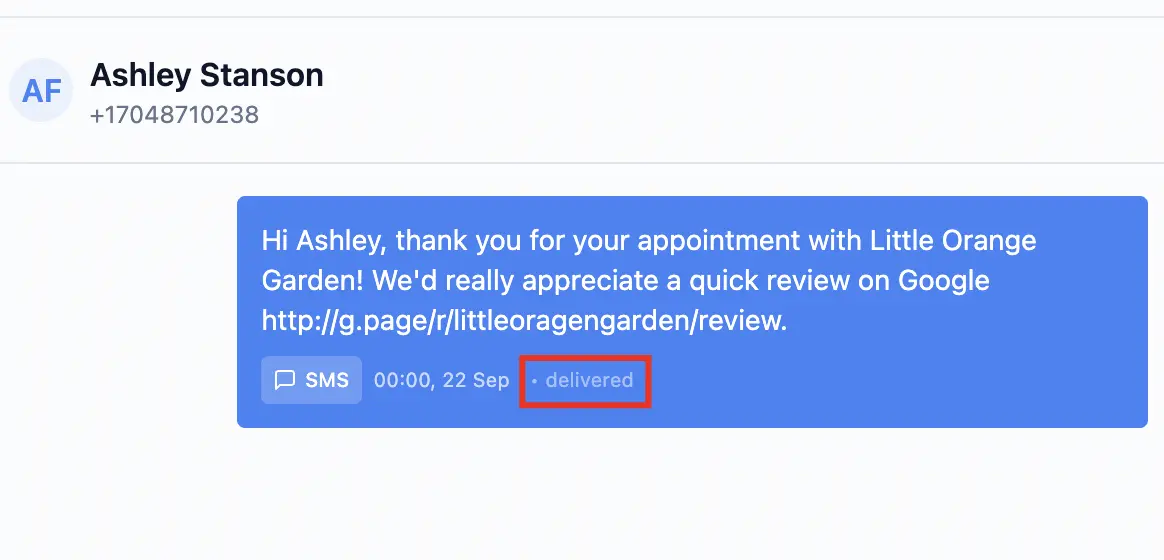
Where you will see it:
Reports has a new SMS delivery section, month by month, showing texts sent, texts confirmed delivered, and a delivery rate. Hover over the rate to see exactly how it is worked out. A small share of texts never get a report back from the network at all; those are left out of the rate rather than counted as failures, and the explanation says so. Months before September show "Not recorded yet", because there was nothing to record.
The monthly summary email now tells you how many contact names Remindlo tidied up for you that month, with a link to your contacts list so you can check them.
Email is kept separate on purpose. Only text messages come back with a delivery report, so email campaigns are not mixed into the delivery figures, where they would read as failures.
Reports are available on paid plans. The contacts list, where you check and correct names, is available on every plan.
Numbers That Cannot Take a Text Are Caught First
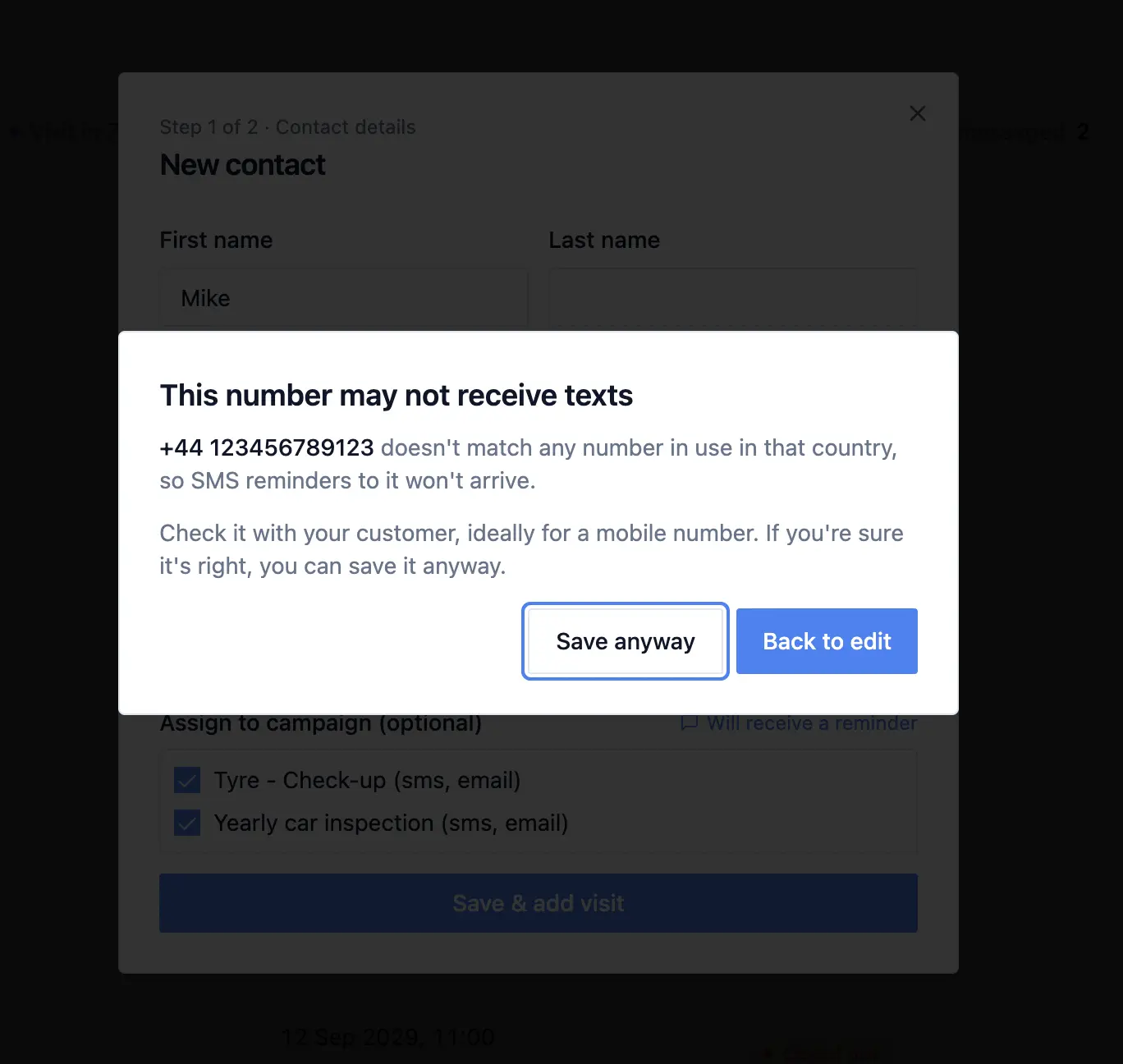
One of the most common reasons a text fails is not the network at all. It is a number that was never going to accept an SMS: a landline, a freephone or premium number, or a number that does not exist.
When you type one in, Remindlo now warns you as you save the contact, and says which kind of number it is. It is a warning, not a block: you may know something we do not, so the choice stays yours.
When calendar sync finds one, for example a landline written in the event description, it no longer uses it for text reminders. That saves you paying for a message that could not arrive.
Reminder Dates Are Right in Every Time Zone
This one was a real bug, and it is worth knowing about if you book all-day appointments.
Dates in reminders were being worked out in UTC rather than in your own time zone. For a UK business during British Summer Time, an all-day appointment could go out with a reminder naming the day before. Dates in messages are now always read in your workspace's time zone, so the date and the time in a reminder always refer to the same day.
In the contacts list, upcoming visits now read "today", "tomorrow" or "in 5 days", counted in your own time zone, so you can see at a glance who is coming up.
Outlook and Microsoft 365: Sign In and You Are Connected
Outlook users no longer need to publish a calendar link. In Dashboard > Integrations, choose Connect Microsoft Account, sign in, and accept the permissions. That is the whole setup.
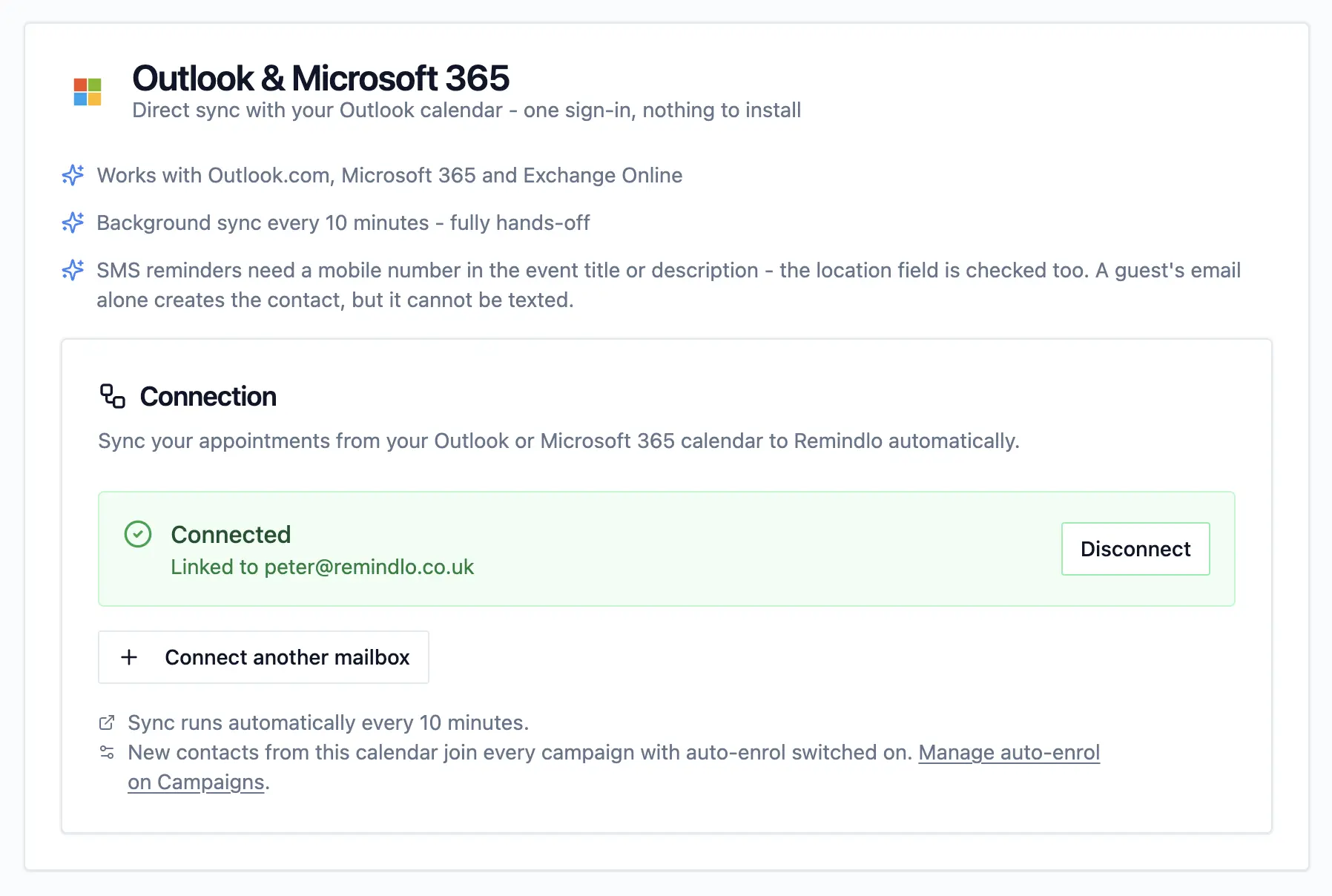
Works with Outlook.com and Microsoft 365 work or school accounts. Some organisations require an administrator to approve new apps; if yours does, Microsoft will say so during sign-in.
Checked roughly every ten minutes, rather than hourly as with a published calendar link, so new bookings, changes and cancellations reach your reminders much sooner.
Nothing to install. It runs on Remindlo's servers, so Outlook does not need to stay open, and you can keep booking from Outlook on the web, Windows, Mac or your phone.
Remindlo only reads your calendar. It never edits it.
It reads the default calendar of the account you connect. If you keep appointments in a separate calendar, the published calendar link (ICS) route is still there for that. Connect each calendar one way only, so the same appointment is not imported twice.
Several Google and Microsoft Accounts in One Workspace
Many businesses do not keep a single diary. Each stylist, therapist or mechanic has their own calendar, or the front desk books into a shared account while the owner keeps a personal one.
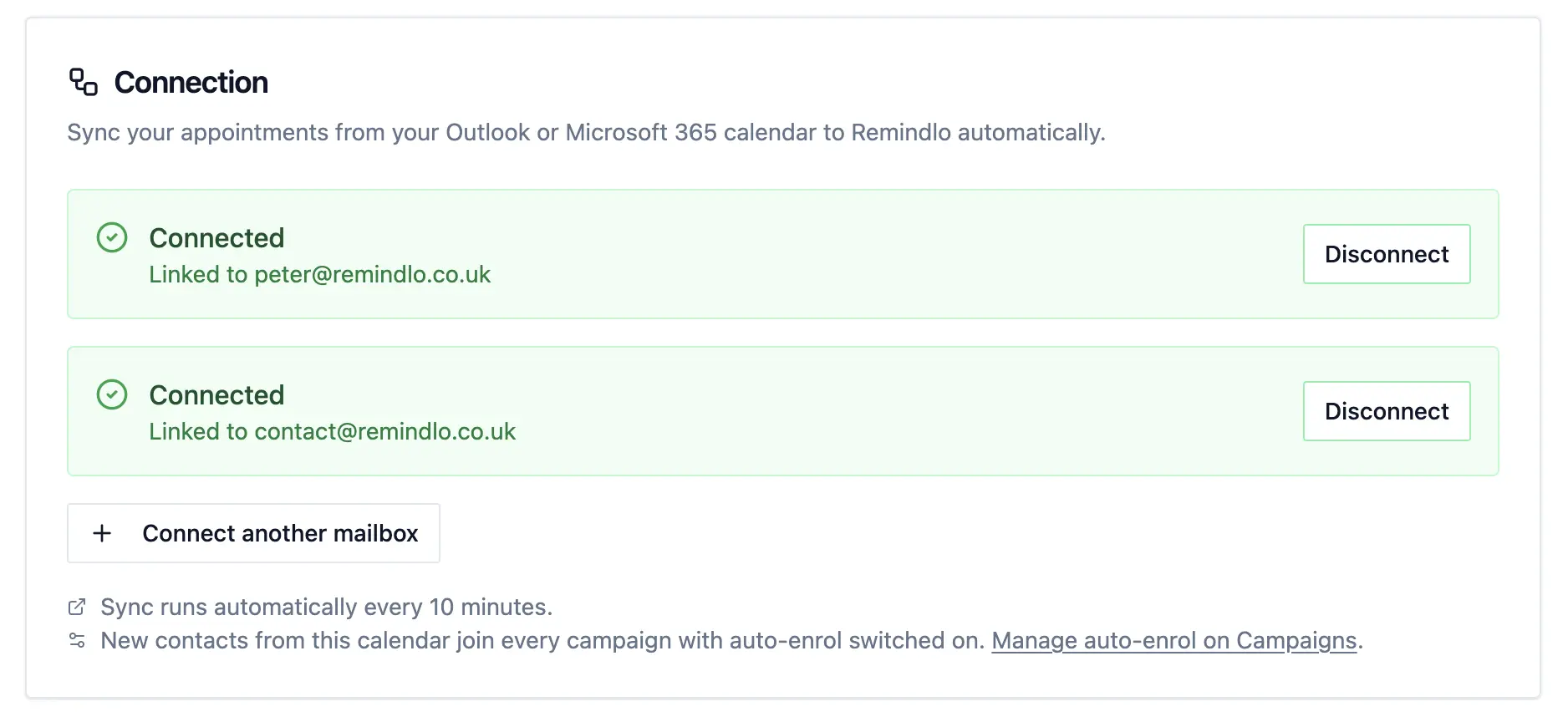
The Integrations page now handles that properly:
Every connected account is listed. Previously, the page showed only the most recently connected Google account or Microsoft mailbox, even when more were syncing, so a second calendar could be working without you being able to see it.
Add another in one click. Use Connect another Google Account or Connect another mailbox to bring in the next calendar. Each one syncs on its own, and all of them feed the same contacts and campaigns.
Disconnect one without touching the rest. Each account has its own Disconnect button, and removing one leaves the others syncing as before. Before this change, disconnecting could leave a second account behind, which looked like a disconnect that had failed.
A problem with any account is flagged. If one of several accounts loses its connection, for example because a password changed or access was withdrawn, the Integrations page and the sidebar now show it, instead of only checking the newest account.
The buttons were also reworked on phones, where long labels used to be squeezed edge to edge.
Your Dashboard Now Tells You What Needs Attention
The most common reason a reminder does not go out is not a fault. It is a setting: a contact who is not in a running campaign, a campaign that is paused, a customer with no visit booked. Until now you had to work that out yourself. This month the dashboard does it for you.
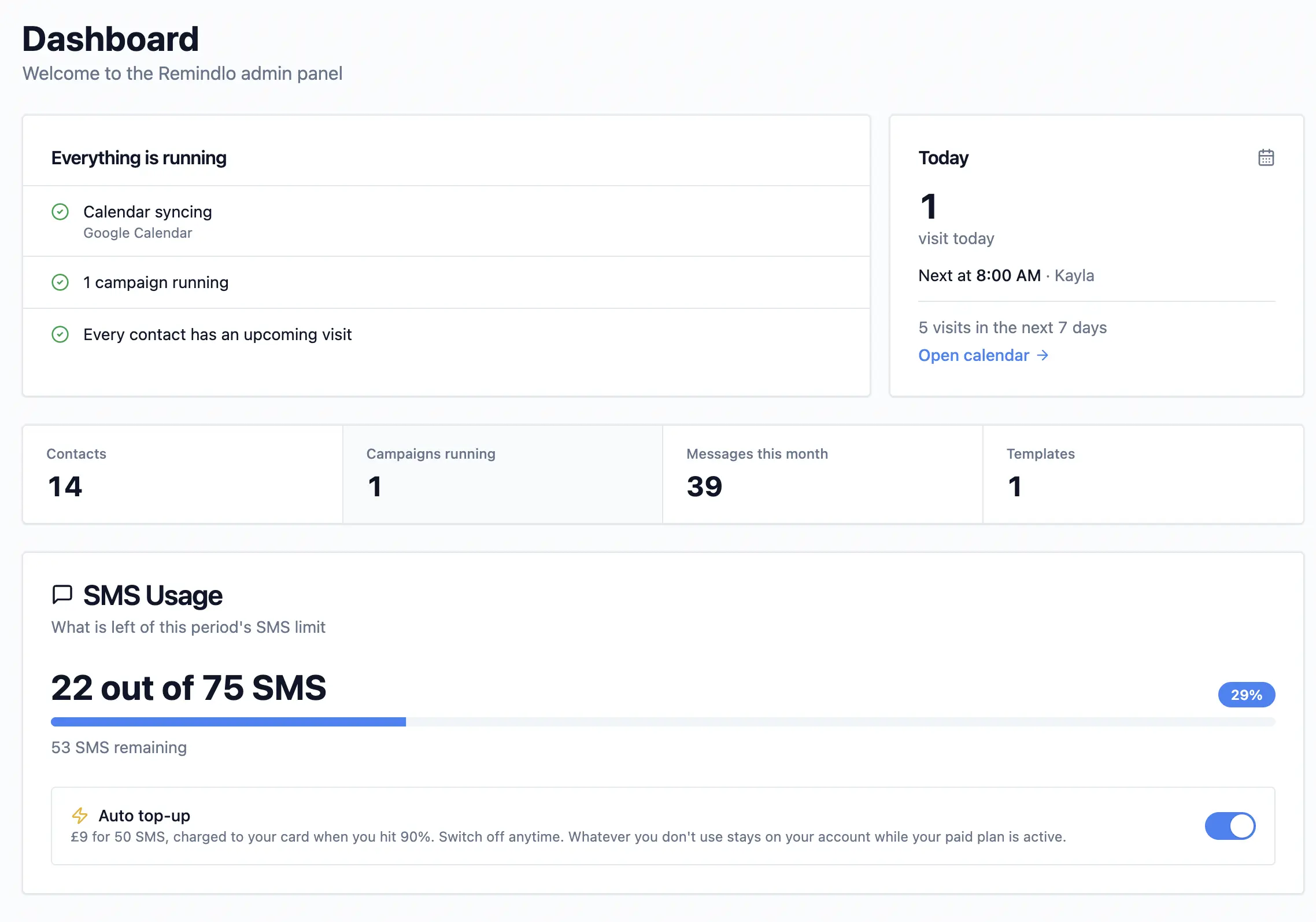
Workspace overview. A short checklist on the dashboard home: is a calendar syncing, is a campaign running, does any campaign add new contacts automatically, and how many contacts cannot currently be reminded, grouped by reason. Every warning links straight to the page where you fix it.
Today. How many visits are booked for today and who is next.
A reminder status on every contact. The contacts list now says, contact by contact, whether reminders are on and, if not, why: No visit booked, Not in a campaign, No consent, Opted out, or no way to reach them on the channel their campaign uses. Each status carries a one-line explanation of what to do.
The calendar explains itself. A small info button on the Calendar page explains which events appear there and why some do not (an event with no phone number or email has no one to remind). Short appointments are easier to read, with the details on hover. From a visit, you can now jump straight to the customer it belongs to.
Remindlo Reads Your Calendar More Accurately
A round of improvements to how appointments are read from Google, Outlook and ICS calendars:
Phone numbers in the Location field are now picked up, so a number you put where the address would go is no longer missed.
Repeating appointments in ICS feeds are now expanded into each individual visit, so a weekly or yearly booking gets a reminder every time, not just the first.
Time zones from Outlook and Exchange feeds, which name zones the Windows way ("GMT Standard Time"), are now read correctly, so those appointments land at the right hour.
Meeting rooms and equipment on an ICS invitation are recognised as resources and no longer become contacts.
Numbers with a significant leading zero are kept intact rather than shortened.
A booking whose email belongs to a different customer no longer mixes the two records up. The visit stays with the customer the phone number matches, and the other customer's details are left as they were.
Steadier syncing when one calendar is very large. One oversized calendar can no longer hold up everyone else's sync cycle; it is simply picked up again on the next run.
Google Calendar Add-on: Works Before You Connect Your Calendar
If you use the Remindlo add-on inside Google Calendar, Save & Sync now works even before you have connected your calendar for automatic sync. The appointment on screen is sent to Remindlo and its reminders are scheduled.
One honest difference remains, and the add-on now says so: without automatic sync, Remindlo cannot see when an appointment is later cancelled, so the reminder would still go out. That is why the add-on recommends connecting the calendar, which takes one click.
The add-on also now has separate first name and last name fields, so you can type a customer's name exactly as you want it to appear in their messages.
SMS Top-ups: Nothing Is Lost at Renewal
Two changes to how extra SMS work on paid plans:
Unused top-up SMS now carry over. SMS you bought on top of your plan stay on your account for as long as your paid plan is active. Only your included monthly or yearly allowance resets at renewal, and it is always used first. A pack bought a few days before renewal and not used in full is no longer money lost.
Every top-up comes with a proper invoice. Automatic top-ups are now issued as invoices on your subscription, showing how many SMS were added, so they sit alongside your plan invoices in your records.
We also fixed faults that could stop an automatic top-up from going through, and downgrading now shows a confirmation that names the date your plan changes, instead of dropping you on the billing portal's home screen.
A Smoother Start for New Accounts
The setup wizard opens wherever you arrive. New accounts used to see it only if they landed on the dashboard home first. Arriving from an email link, a bookmark or the Outlook task pane now opens it too.
Starter campaigns are created reliably. The three campaigns every new workspace starts with (before the visit, after the visit, and bringing customers back) are now set up by our servers at sign-up rather than by your browser, so a dropped connection can no longer leave a new account without them.
Every Number We Publish Now Has a Source
We have added an Evidence page. Every figure on the Remindlo website now comes from one of three places, and the page says which: our own measurement, with its sample and date; somebody else's research, with a citation and a link; or an assumption you can change yourself, as in the no-show cost calculator.
Smaller Improvements
Deleting a contact now deletes their visits too. Their message history is kept, and messages whose contact has been deleted now show as "No contact" with the phone number they were sent to, so your log stays complete.
Closing the contact edit window returns you to where you were in the list, instead of jumping back to the top of the page.
A new About page, with who is behind Remindlo, how it works, and answers to the questions we are asked most. It's also a place where you can read more about the Remindlo founder - Peter.
Redesigned industry and use-case pages, and a new hub at
/forthat lists every situation Remindlo is used for.A faster website. Images are now sized to your screen, so phones no longer download desktop-sized pictures, and an update to the site no longer forces returning visitors to download almost the whole thing again.
What This Means for Users
If you sync a calendar, open your contacts list first. The name marker shows you which names Remindlo worked out for you, and the new reminder status shows, contact by contact, who will and will not get a reminder, and why.
If you are on a paid plan, the SMS delivery section in Reports is the new place to see whether your texts are arriving. From October onwards, it builds a month-by-month record.
And if you book in Outlook, you no longer need to publish your calendar anywhere. Sign in with Microsoft from the Integrations page and you are connected.