
What's New in Remindlo: May 2026
Recent product updates in Remindlo include Universal Calendar support, a new Calendar view, improved visit management, SMS auto top-up, and better reminder templates.
Contents
- Connect More Calendars with Universal Calendar
- Easier Universal Calendar Setup and Troubleshooting
- New Calendar View for Scheduled Visits
- Add Visits Directly from the Calendar
- Better Visit Details and Reminder Context
- Recurring Service Visits Are Easier to Manage
- Contact Pages Now Show Visit History
- Canceled Visits Stay Visible but Stop Queued Reminders
- SMS Auto Top-Up for Paid Plans
- Improved SMS Usage Alerts
- More Ready-Made SMS Templates
- Better Date, Time, and Locale Handling
- Smaller Dashboard and Mobile Improvements
- New Help and Setup Guides
- What This Means for Users
This month, we focused on improving Remindlo for businesses that manage real appointments, repeat visits, and service renewals. The biggest updates are calendar-related: Remindlo can now connect to more calendar providers, show scheduled visits in a dedicated calendar, and handle recurring service visits more clearly.
We also improved SMS usage management, added more ready-made reminder templates, and made several mobile and usability refinements across the dashboard.
Connect More Calendars with Universal Calendar
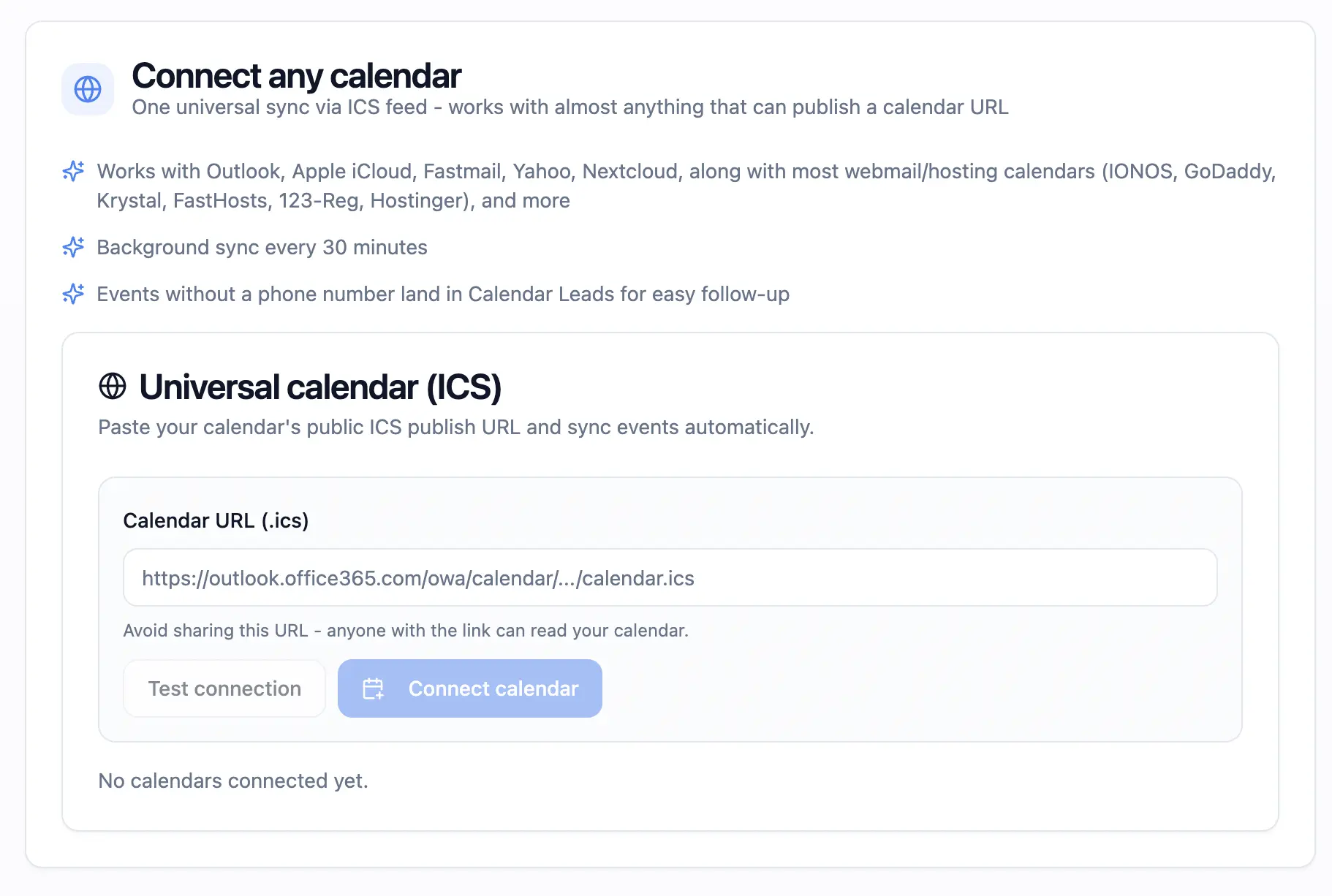
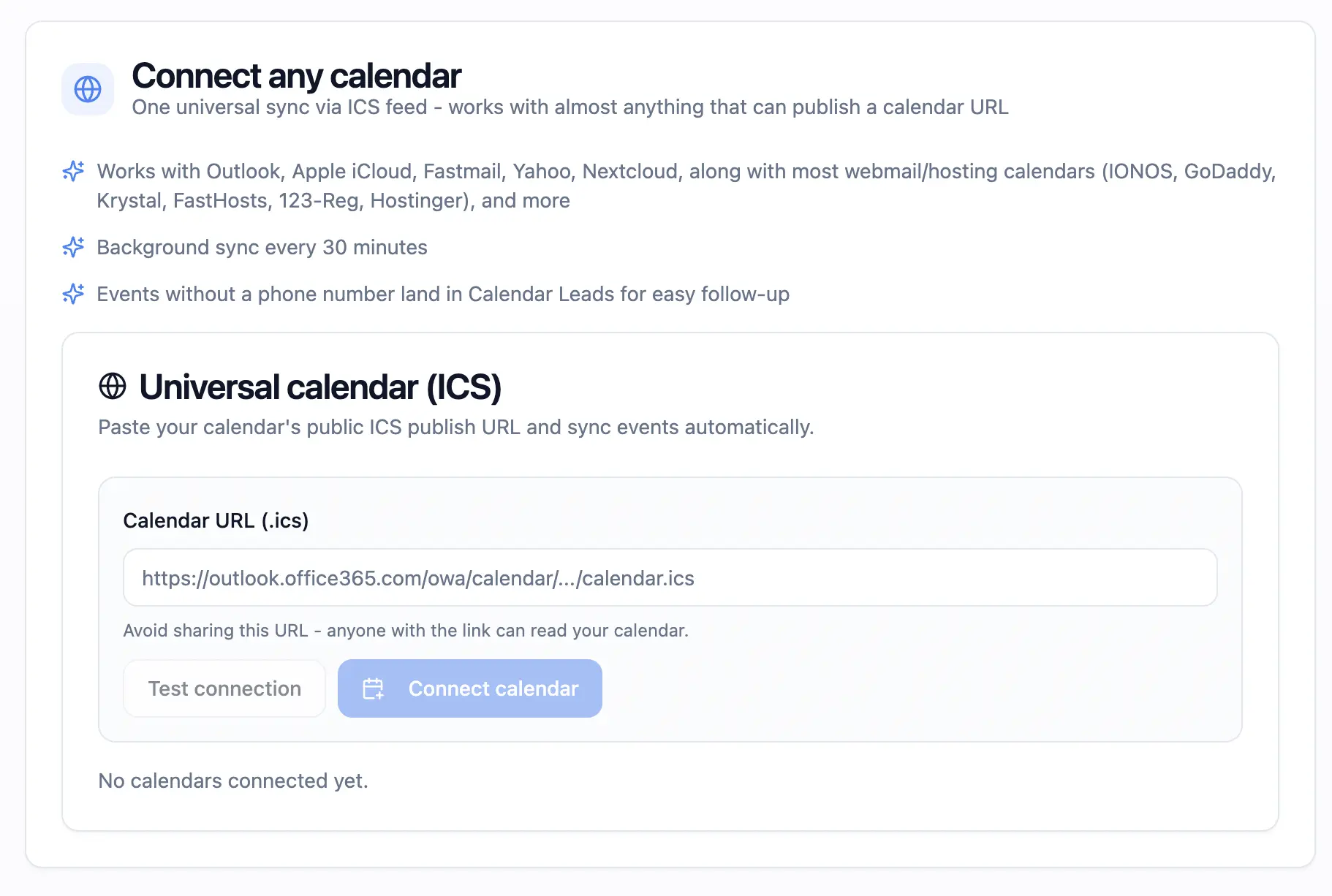
Remindlo now supports Universal Calendar connections using ICS calendar feeds. This means you can connect calendars beyond Google Calendar, including Outlook, Microsoft 365, Apple iCloud, Fastmail, Yahoo, and many webmail calendars that publish an iCalendar URL.
If your calendar provides an .ics or calendar publish URL, you can paste it into Remindlo and test the connection before saving it. Once connected, Remindlo can read upcoming events and use them for SMS reminder workflows.
This is useful if your business does not use Google Calendar, or if appointments are already managed in Outlook, iCloud, or a calendar included with your email hosting.
👉 Connect it through the Integrations section.
Easier Universal Calendar Setup and Troubleshooting
We also added several setup improvements around Universal Calendar:
You can test an ICS calendar URL before connecting it.
Remindlo shows how many events were found when the test succeeds.
If the URL is not a valid calendar feed, the message is clearer and links to a setup guide.
Connected calendars show their sync status and last sync time.
If a calendar stops syncing, Remindlo shows a warning with the latest error.
Removing a connected calendar now has a confirmation step, so it is harder to disconnect one by accident.
If you paste a Google Calendar URL into the Universal Calendar box, Remindlo now nudges you toward the dedicated Google Calendar integration instead. The Google integration is faster and gives fuller sync support for Google users.
New Calendar View for Scheduled Visits
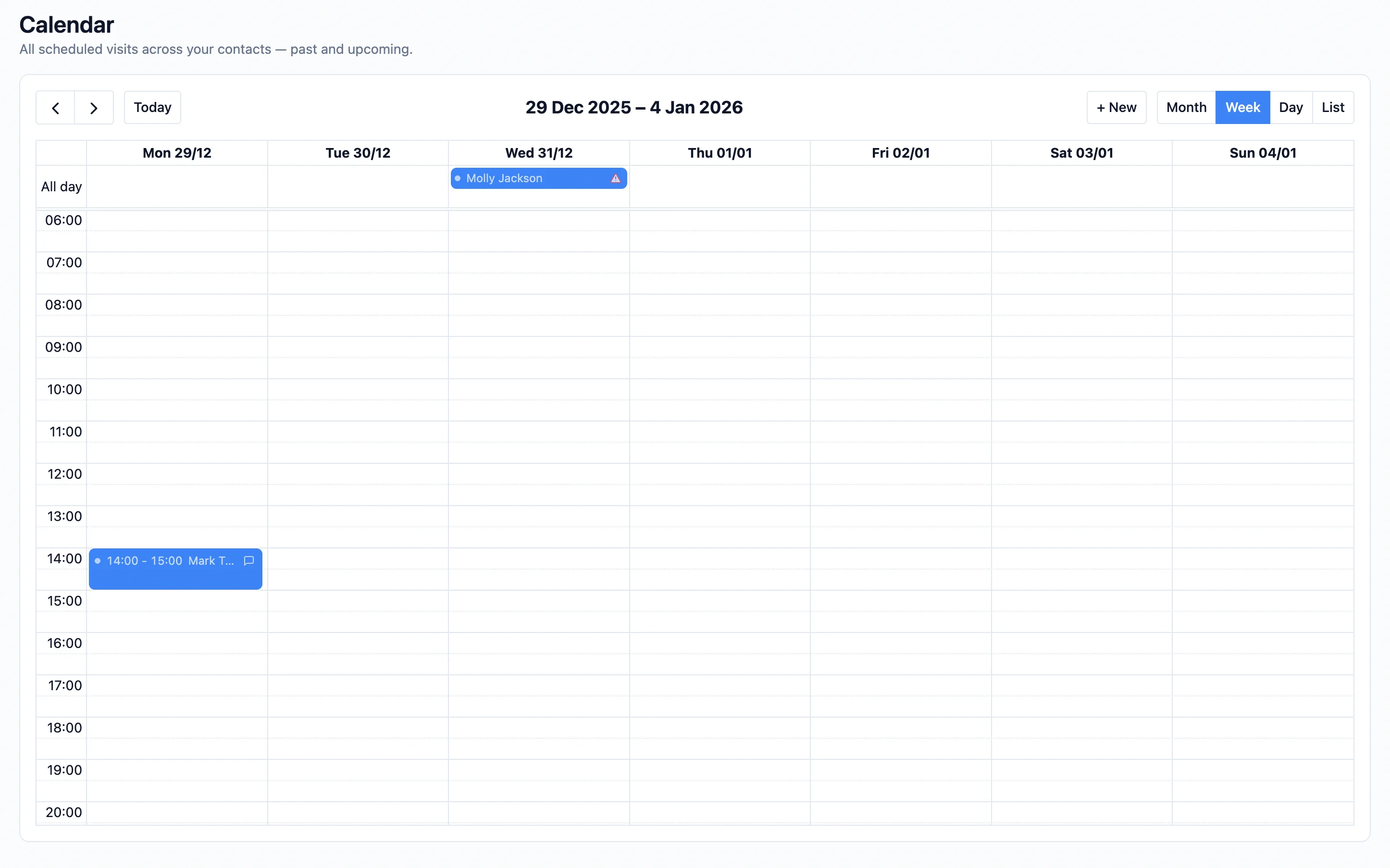
We added a dedicated Calendar page in the dashboard for scheduled visits across your contacts.
Instead of only viewing contacts in a table, you can now see upcoming work in a calendar layout. This helps you plan the week, spot busy days, and check which visits are already connected to reminder campaigns.
On desktop, the Calendar supports month, week, day, and list views. On mobile, Remindlo uses a more compact agenda-style view by default, with a view switcher so you can choose the layout that works best on your device.
The Calendar also remembers your last-used view, so you do not have to switch back every time you return.
👉 See a full guide here.
Add Visits Directly from the Calendar
You can now add a visit directly from the Calendar page. Use the + New button or click into a calendar slot to start creating a visit for an existing or new contact.
When there are no visits in the current agenda view, Remindlo now shows a clear add-visit action instead of leaving an empty state with nowhere to go.
This makes the Calendar useful not only for checking upcoming work, but also for planning new appointments and service visits.
Better Visit Details and Reminder Context
The visit dialog now gives more context about whether a visit is ready to receive reminders.
When a contact is linked to a visit, Remindlo can show whether that contact has the essentials needed for reminder delivery: a phone number, marketing consent, and at least one running campaign. This helps you catch problems before the reminder date arrives.
We also made the visit form cleaner. Less common fields like title, location, and notes now sit behind a "More details" toggle, keeping the main flow focused on the contact and visit date.
Recurring Service Visits Are Easier to Manage
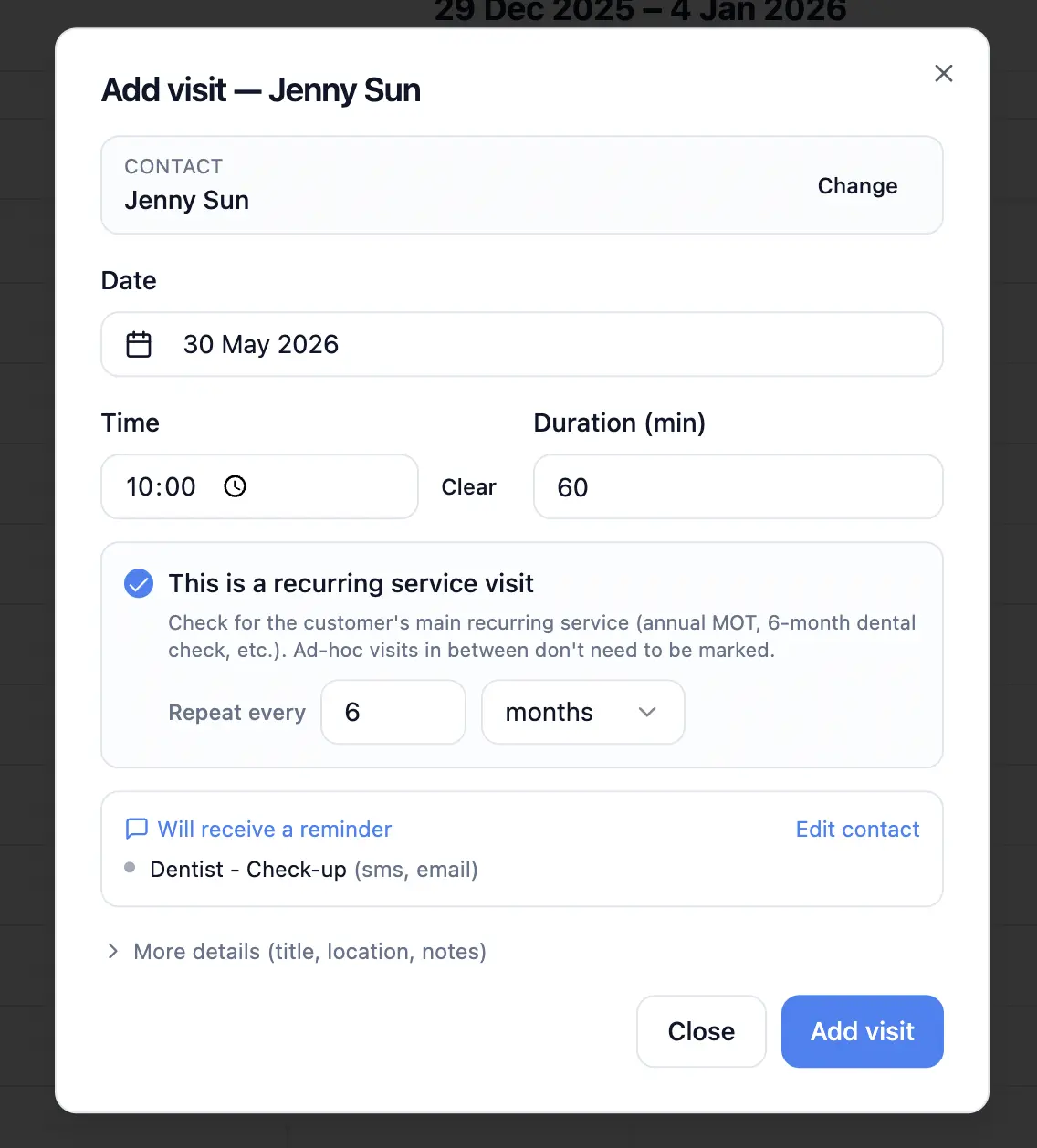
Recurring reminders are now more closely tied to visits instead of only living as a date on the contact record.
You can mark a visit as the customer's periodic service visit, for example an annual MOT, a six-month dental check-up, a boiler service, a pet vaccination, or another repeat appointment. Remindlo uses that visit as the anchor for future reminder timing.
This makes recurring work easier to reason about because the reminder cycle is connected to an actual appointment. Existing next-visit dates have also been moved into the newer visit model, so older contacts continue to work with the updated flow.
Contact Pages Now Show Visit History
Contact records now include a clearer visit section. You can review past and upcoming visits, add another visit, or open an existing visit for editing.
For customers with recurring service cycles, the first recurring visit can act as the anchor for the cycle. Extra one-off visits can still be added without changing the main recurring reminder schedule.
This is useful for businesses where a customer may have both regular appointments and occasional extra visits.
Canceled Visits Stay Visible but Stop Queued Reminders
Canceling a visit no longer behaves like simply deleting it from view. Canceled visits remain visible in the Calendar with muted styling, so you still have a record of what happened.
At the same time, queued reminders linked to that canceled visit are removed, helping prevent accidental SMS messages for appointments that are no longer going ahead.
SMS Auto Top-Up for Paid Plans
Paid plans now have SMS auto top-up support.
When enabled, Remindlo can automatically purchase an additional SMS pack when your usage reaches the top-up threshold. The dashboard also shows your base SMS allowance, additional SMS packs, total available messages, and packs purchased this month.
If you enable auto top-up while you are already near the threshold, Remindlo attempts to top up immediately instead of waiting for the next daily usage check.
This helps reduce the chance of reminders being blocked because the account has run out of SMS credits.
Improved SMS Usage Alerts
We refined SMS usage monitoring and rejection notifications.
Remindlo now handles subscription reset dates more accurately and reduces repeated notifications when usage crosses warning thresholds. The usage banner is also hidden when an account has no meaningful SMS allowance to show, making the dashboard less noisy.
More Ready-Made SMS Templates
We expanded the SMS template experience with more use cases and clearer template cards.
New and improved template areas include:
Appointment reminders
Post-visit thank-you notes
Review requests
Customer follow-ups
Industry-specific SMS reminder examples
Template cards now include character counts and clearer actions, making it easier to choose a message and turn it into an automated reminder workflow.
Better Date, Time, and Locale Handling
We improved how dates and times are formatted across Remindlo, especially for calendar-driven reminders and API responses.
The dashboard now uses tenant-specific formatting more consistently, including 12-hour or 24-hour time display where appropriate. Calendar views also respect the account time zone, so appointment times stay aligned with the business location rather than the device you happen to be using.
Smaller Dashboard and Mobile Improvements
We shipped several smaller usability improvements across the dashboard:
Calendar events now show clearer titles in agenda view.
Canceled visits are visually distinct on the calendar.
The mobile Calendar has a persisted view preference.
The
+ NewCalendar button is more reliable on narrow screens.Contact and visit dialogs are more compact on mobile.
Campaign assignment indicators are easier to scan in Contacts and visit flows.
The sidebar uses a locale-aware currency icon for Calendar Leads.
These changes are small individually, but together they make Remindlo easier to use during day-to-day scheduling.
New Help and Setup Guides
We also added or improved several guides around calendar reminders and SMS workflows, including:
Calendar SMS reminders for Outlook, iCloud, Fastmail, Yahoo, Google, and other calendars
More industry-specific reminder use cases
These guides are designed to help small businesses set up reminders without changing the calendar or booking tools they already use.
What This Means for Users
The practical impact of this release is that Remindlo is becoming more appointment-aware.
You can connect more calendar systems, manage visits directly from the dashboard, see which visits are ready for SMS reminders, and handle recurring service work with more confidence.
For businesses that rely on repeat appointments, renewals, check-ups, and follow-ups, these updates should make Remindlo easier to use as the operational layer around your calendar.