
What's New in Remindlo: June 2026
Recent product updates in Remindlo, including Customer Lifecycle Campaigns, per-campaign auto-enrolment, a new business email template variable, onboarding improvements, and mobile calendar fixes.
Contents
- Customer Lifecycle Campaigns
- Reminders Can Now Fire Before or After the Appointment
- Each Campaign Has Its Own Auto-Enrol Setting
- New Template Variable: {{business_email}}
- Reactivation Timing Adjusted per Industry
- Calendar: Full-Width Layout on Mobile
- Calendar Agenda View: Horizontal Scroll Fixed
- Contact Edit Dialog: Overflow Fixed on Long Visit Locations
- New Related Reading on Industry Pages
- What This Means for Users
This month's focus was on helping businesses communicate with customers across the whole service journey, not just before an appointment. The biggest change is Customer Lifecycle Campaigns, which gives every new account three ready-to-use campaigns covering the visit reminder, a post-visit follow-up, and a reactivation message when a customer goes quiet.
We also improved onboarding to walk through these new campaign types, fixed several mobile layout issues in the calendar, and added a new template variable for including your business email address in messages.
Customer Lifecycle Campaigns
Remindlo now creates three campaigns for every new account, tailored to your business type.
Previously, the default setup covered one thing: reminding a customer before their upcoming appointment. That left a gap. Once the appointment passed, there was no automatic follow-up and no way to bring customers back if they had not booked again.
The three lifecycle campaigns cover the full cycle:
Pre-visit reminder — sent a few days before the appointment, as before.
Post-visit follow-up — sent the day after the visit. Useful for a thank-you, a review request, or a satisfaction check-in.
Reactivation reminder — sent weeks or months after the last visit, depending on your industry. For example, six weeks for a beauty salon or six months for a dental practice. This is the message that brings lapsed customers back.
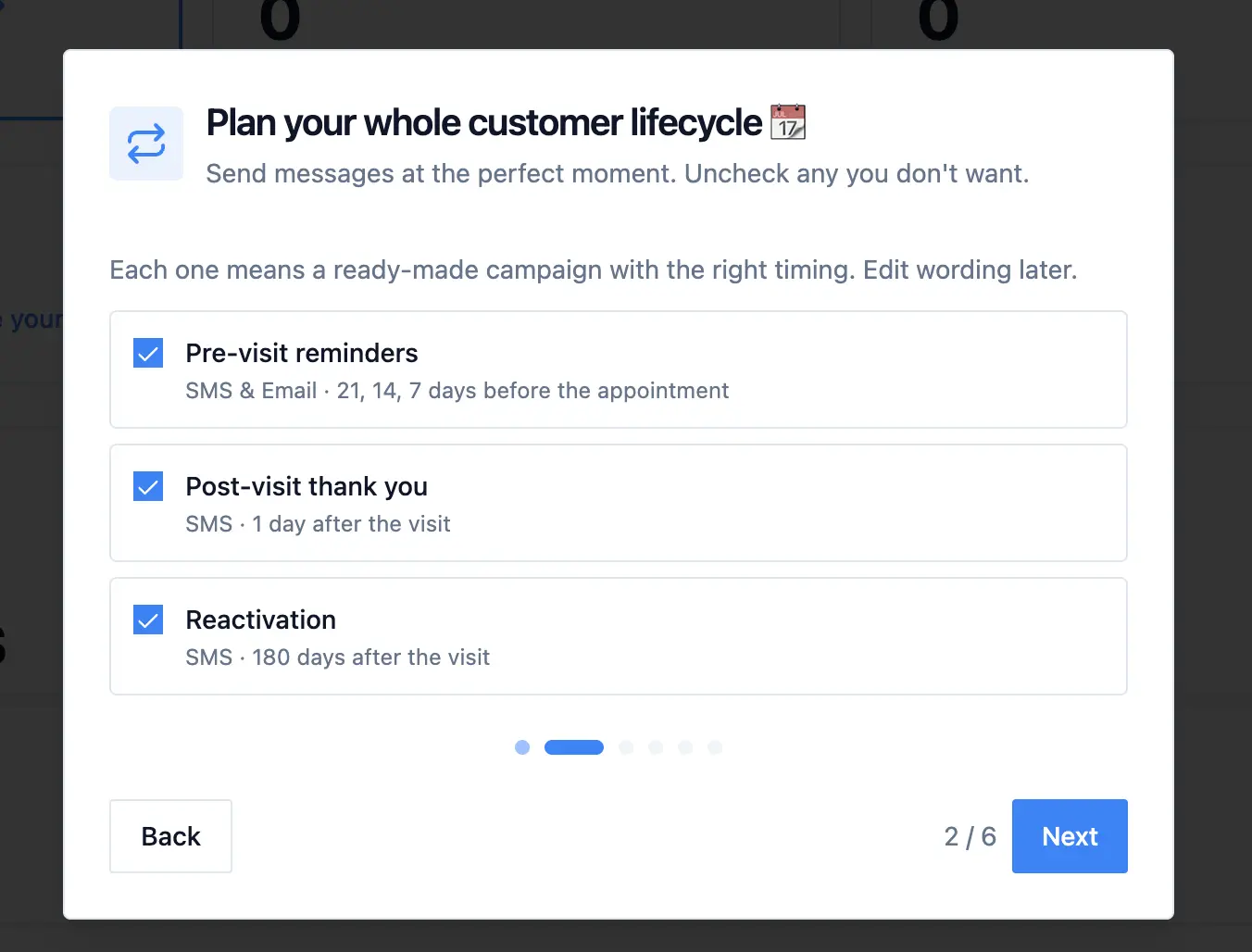
Each campaign is set up with timing and message copy suited to your business type. You can edit any of them from the Campaigns page. More about the use-cases we want to support with the recent change:
Reminders Can Now Fire Before or After the Appointment
The update that makes lifecycle campaigns work is a change to how Remindlo decides when to send a reminder.
Previously, all reminder timing was calculated from next_due_at, the contact's upcoming appointment date. That worked for pre-visit reminders. But once a visit passed, next_due_at was cleared, which meant any "days after the visit" trigger had no anchor and never fired.
Remindlo now tracks two separate anchors:
Before the appointment: counted from
next_due_at, as before.After the last visit: counted from
last_service_at, the date the most recent service was completed.
When a visit passes, last_service_at is updated automatically for contacts synced through your calendar. Post-visit and reactivation campaigns use this anchor, so the reminder fires reliably even when no future appointment is booked yet.
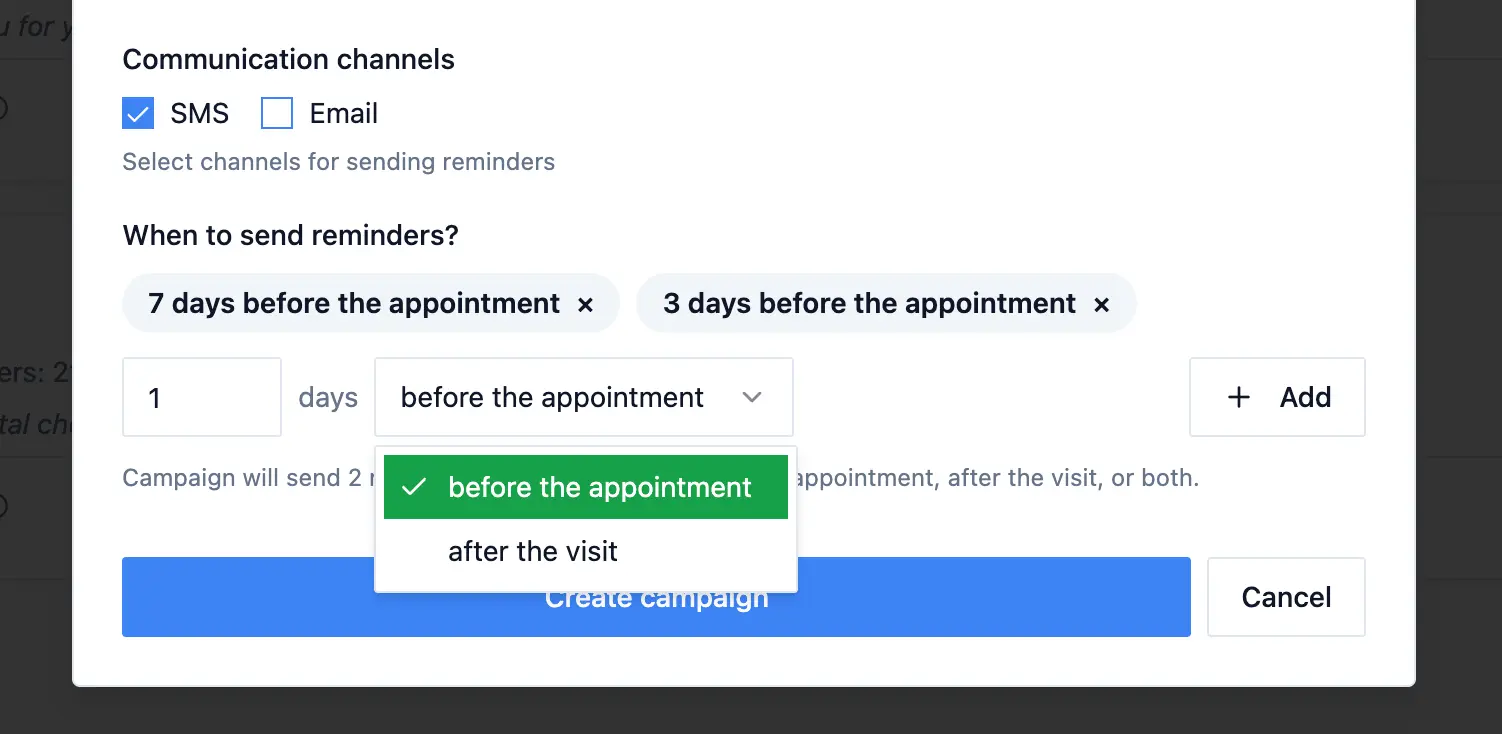
The distinction is invisible in the dashboard. When creating or editing a campaign, you simply choose whether reminders fire "before the appointment" or "after the last visit."
Each Campaign Has Its Own Auto-Enrol Setting
Previously, there was a single toggle that controlled whether new calendar contacts were enrolled into a campaign. That setting applied to one campaign at a time.
Now each campaign has its own Auto-enrol new contacts switch. When turned on, new contacts synced from your calendar are automatically enrolled into that campaign. When turned off, the campaign runs only for contacts you enrol manually.
The three lifecycle campaigns all start with auto-enrol enabled. If you want to pause automatic enrolment for one campaign without affecting the others, you can toggle it individually from the Campaigns page.
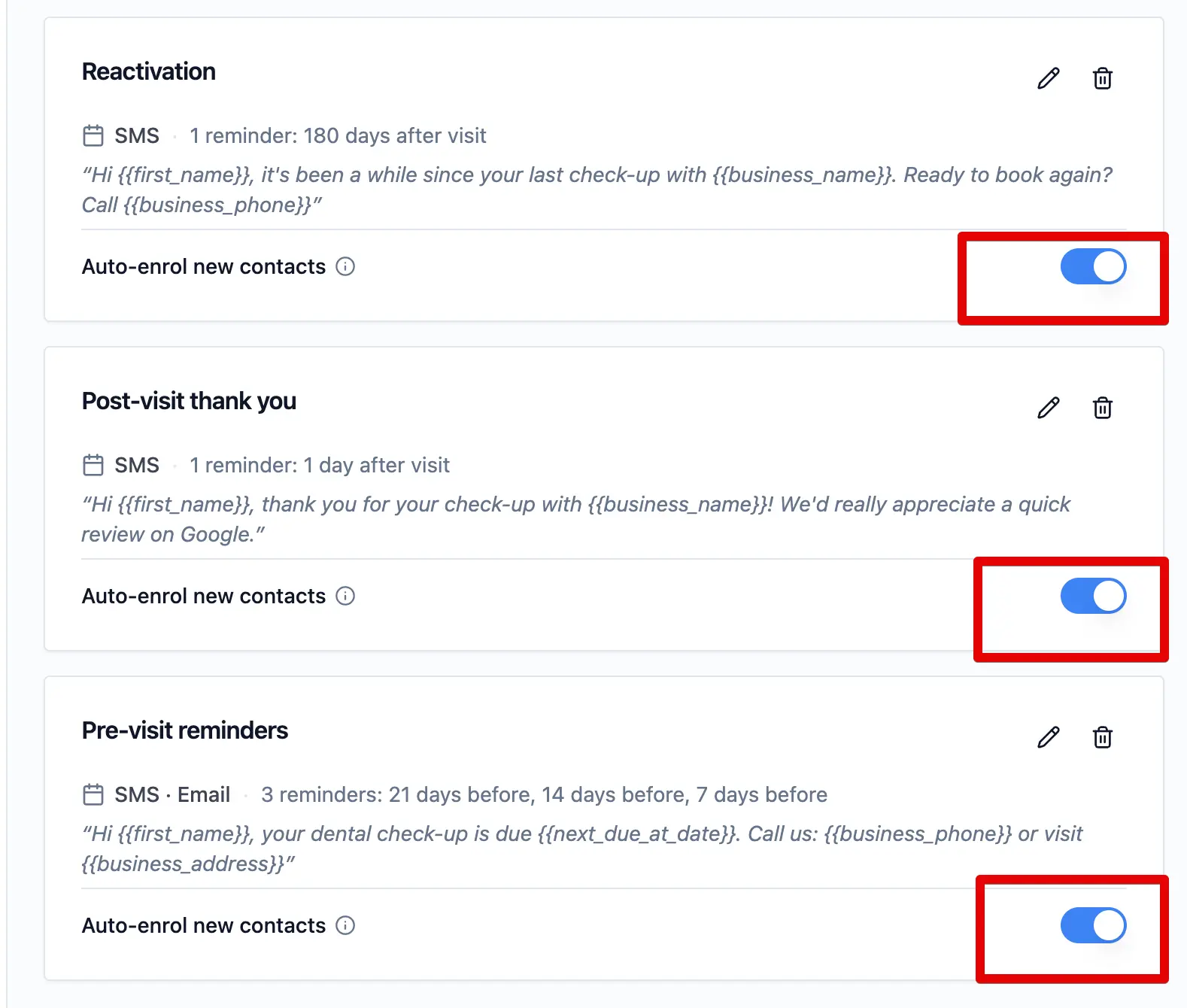
If none of your running campaigns have auto-enrol turned on, the sidebar shows a prompt to remind you. A contact who never gets enrolled will never receive any reminders.
New Template Variable: {{business_email}}
You can now include your business email address in SMS and email templates using {{business_email}}.
This is useful for follow-up messages where you want customers to be able to reply or ask a question by email, and for messages like "reply to this email or call us to rebook."
The variable pulls from the email address set in your business settings. If you have not set a business email yet, you can do so under Settings → Business Details.
Reactivation Timing Adjusted per Industry
The default reactivation delay, the period after a visit before Remindlo sends a "we have not seen you in a while" message, has been adjusted for several business types to better match typical service cycles.
Industries with shorter service cycles, such as beauty and personal care, use a shorter reactivation delay. Industries with longer natural gaps, such as dentistry or automotive services, use a longer one. If the default does not match your business, you can change the timing in the campaign settings.
Calendar: Full-Width Layout on Mobile
The calendar on mobile now spans the full width of the screen. Previously, it sat inside the dashboard's side padding with a visible border on both sides, which pushed the month navigation arrows close to the edge. On narrow screens the arrows were partially obscured.
The calendar now runs edge-to-edge on mobile with the side borders removed, giving the toolbar and grid more room. On wider screens the layout remains unchanged.
Calendar Agenda View: Horizontal Scroll Fixed
In the calendar's list and agenda view, contact names could overflow their column and push the campaign status icon off to the right, producing a horizontal scroll bar. This happened because the table column width was driven by the full untruncated contact name.
The list view table now uses a fixed column layout. Contact names that are too long are truncated in place, the status icon stays visible, and horizontal scrolling no longer appears.
Contact Edit Dialog: Overflow Fixed on Long Visit Locations
The contact edit dialog could grow wider than the screen when a visit record included a long location name. The location text did not truncate as expected because the dialog's grid layout was allowing its columns to expand to fit the content.
This is now fixed. Long visit titles and locations are truncated within the dialog, and the form stays within the screen width on mobile.
New Related Reading on Industry Pages
Several industry landing pages now include a Related reading section at the bottom, linking to relevant guides and blog posts.
Pages updated this month include Automotive, HVAC, MOT Testing, Veterinary, Accounting, and Beauty. The links point to setup guides for calendar reminders, industry-specific reminder examples, and articles on reducing no-shows.
What This Means for Users
The practical impact of this release is that Remindlo now covers more of what happens after a visit, not only what happens before one.
For businesses with repeat customers and regular service cycles, the combination of post-visit follow-ups and reactivation reminders means customers are more likely to hear from you at the right moments without you having to set up any of it manually. The campaigns are there from day one, ready to run.
If you created your account before this update, the three lifecycle campaigns have not been added automatically. You can set them up from the Campaigns page using the pre-visit, post-visit, and reactivation campaign types.