
Reports: Track Your Contacts and SMS Reminders Every Month
See how many contacts you have built and how many SMS reminders you sent - at a glance, every month. Understand what is working in your small business and reduce no-shows with data.
Contents
- What You See in Reports
- The Contacts Column: Building Your Contact List
- The Messages Sent Column: Is Your Autopilot Running?
- Names Tidied Up: Reminders That Greet People Properly
- SMS Delivery: Did Your Texts Arrive?
- Monthly Summary Email
- Reports are available on Paid Plans
- How to Use Reports to Improve Your Business
- Building a Contact List That Sends Reminders Automatically
- Common Questions
- Need Help?
The Reports section in Remindlo gives you a monthly snapshot of the things that matter most to a small business: how many contacts you have built up, how many reminders you have actually sent, whether your texts reached your customers' phones, and how many messy calendar names Remindlo cleaned up for you. No complicated dashboards - just two clean tables, updated every month.
If you are working to reduce no-shows, grow a reliable contact list, or simply want to know whether your SMS reminders are going out and arriving, Reports is where you check.
What You See in Reports
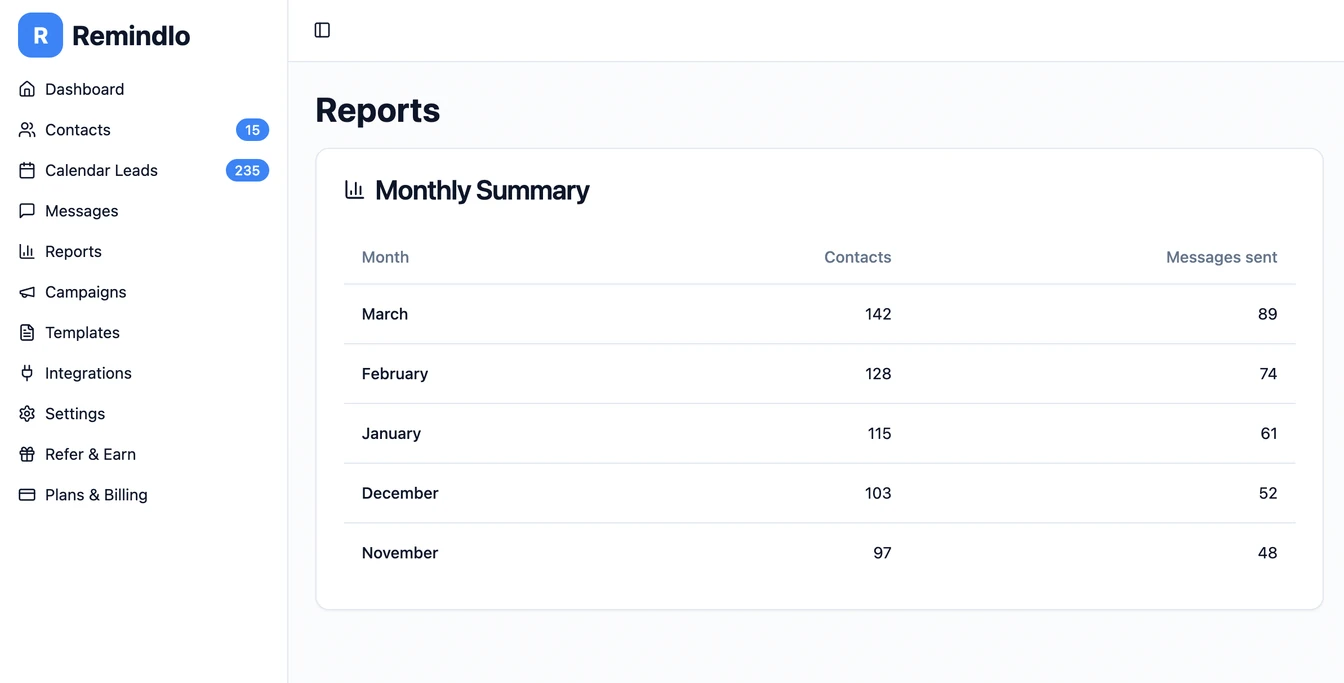
Reports is made of two tables, one row per month, newest first.
The Monthly Summary table has four columns:
Month - the calendar month being summarised (e.g. March 2026).
Contacts total - the total number of contacts in your Remindlo database when that month's summary was produced.
Messages sent - every reminder that went out during that month, text messages and emails together.
Names tidied up - contact names Remindlo worked out for you from your calendar entries that month.
The SMS delivery table covers text messages only and has four columns: Month, SMS sent, SMS delivered and Delivery rate.
The Contacts Column: Building Your Contact List
Every contact you add to Remindlo - whether manually, via CSV import, through Google Calendar sync, or using the AI Diary Scanner - is counted here. Watching this number grow month over month tells you whether you are consistently capturing customer details.
For small businesses, a growing contact list is one of the most valuable assets you can build. It means:
You can send reminders to more clients before each appointment.
You have a list you own - not locked inside a booking platform.
You can reach out to lapsed customers when bookings slow down.
If the contacts count is not growing, it is a signal to check your contact capture workflow. Are phone numbers being collected at booking? Is your Google Calendar integration active?
The Messages Sent Column: Is Your Autopilot Running?
The messages count shows how many reminders actually went out each month, by text and by email. This is the clearest measure of whether your reminder system is working in practice.
A consistent messages count month after month means your autopilot is running reliably. A sudden drop is a prompt to check:
Whether your Google Calendar connection is still active.
Whether new appointments include phone numbers.
Whether your campaign is still enabled.
Does sending reminders actually cut no-shows? The strongest evidence comes from healthcare: pooled across eight randomised trials, 78.6% of patients turned up after a text reminder, against 67.8% with no reminder at all. Those are patients rather than customers of a garage or a salon, which is why we will not promise you a particular drop in no-shows. See the research behind that figure, and what it does not let us claim. What the messages sent figure does give you is your own side of the equation: exactly how much reminding you did each month, so you can hold yourself accountable to it.
Names Tidied Up: Reminders That Greet People Properly
Calendar entries are written for you, not for your customer. A booking reference, some initials or the name of the service often sits where the customer's name should be, and a reminder that opens with "Hi Full Service" is not one anybody wants to receive.
Where a calendar entry held something other than a proper name, Remindlo works the name out in the background, so your reminders greet people by something they recognise. Nothing is queued for you to approve. The Names tidied up column counts how many names were sorted out this way each month.
Each of those contacts is marked with a sparkle in your contacts list, showing the calendar entry the name came from, so you can check any of them and edit one that looks wrong.
SMS Delivery: Did Your Texts Arrive?
A reminder that never reaches a phone cannot stop a no-show. The SMS delivery table tells you how many of your texts actually arrived, based on the delivery receipts the mobile networks send back for every message.
SMS sent - text messages that went out that month. Emails are not included, because email gives us no delivery confirmation of any kind.
SMS delivered - the texts the mobile network confirmed arrived on the customer's phone.
Delivery rate - delivered texts as a share of the texts the network gave us an answer for. Hover over the rate to see how that month's figure breaks down.
Every text ends up in one of three groups: confirmed delivered, rejected by the network, or never confirmed either way. The last group is small, and it is left out of the rate rather than counted as a failure. That is why delivered divided by sent will not always match the rate you see.
It is also exactly how we count the delivery figure we publish for Remindlo as a whole on our evidence page. Your dashboard and our website use one method, so you can put your own rate next to ours and compare like with like.
A text rejected by the network usually means the number is a landline, has been disconnected, or was mistyped when the contact was added. If your delivery rate drops, the rejected texts are the place to start: check and correct those numbers in your contacts list. Note that you are charged for every text the network accepts, including those it later rejects, so fixing bad numbers saves you money as well as no-shows.
Monthly Summary Email
At the beginning of each month, Remindlo automatically sends you a recap email with your contacts and the messages sent in the previous month. This lands in your inbox without you needing to log in - a passive way to stay on top of your numbers.
If Remindlo tidied up any contact names during the month, the email tells you how many and links to both your Reports and your contacts list, where each name can be checked.
The email also includes links to the latest Remindlo blog posts, so you can pick up tips on reducing no-shows and growing your client list between sessions.
If your contacts or messages count is zero, the email includes specific guidance to help you get started - whether that is adding your first contacts, setting up a campaign, or connecting your calendar.
Reports are available on Paid Plans
The Reports section is available to Remindlo users on a paid plan. If you are on the free plan, you will see a blurred preview of both tables and a prompt to upgrade. The sparkle markers in your contacts list are available on every plan.
To see your reports, view pricing and upgrade your plan.
How to Use Reports to Improve Your Business
Here are a few practical ways to get value from the monthly figures:
Set a contacts target. If you want 200 contacts by the end of the quarter, watch the monthly count and adjust how aggressively you capture details.
Cross-reference with no-shows. When messages sent are high and your no-show rate is low, that is a good sign your reminders are doing their job. Use it to judge the cost of your plan for yourself or with a business partner.
Spot gaps early. A month with low messages sent usually means something broke in your workflow - a disconnected calendar, missing phone numbers in appointments, or a paused campaign. Catching this early limits the damage.
Clean up bad numbers. A falling delivery rate means more texts are hitting landlines, old or mistyped numbers. Correcting them gets more reminders to the right phones and stops you paying for texts that never arrive.
Use it during quiet periods. If your contact count is growing but messages are low, your existing contacts are not being reminded. Set up or review your campaigns so your contact list is actually working for you.
Building a Contact List That Sends Reminders Automatically
Reports works best when contacts are being added continuously. The most effective ways to keep your contact list growing:
Google Calendar sync - connect your calendar and Remindlo automatically detects phone numbers from event descriptions. Every new appointment adds to your contacts and queues a reminder. → Google Calendar integration guide
CSV import - upload a spreadsheet of your existing clients in one go. Useful when migrating from a paper diary or another system.
Manual entry - add contacts one at a time as new clients come in. Takes 30 seconds per contact and ensures every client is in the system.
AI Diary Scanner - photograph a page from your paper diary and Remindlo extracts client names, phone numbers, and appointment times automatically.
Calendly integration - sync Calendly bookings via Google Calendar so every online booking becomes a contact with reminders scheduled. → Calendly SMS reminders guide
9,000+ other ways through Zapier integration - thanks to our Zapier integration you can connect Remindlo with more than 9,000 other products and build your list automatically, e.g. from Google Sheets. See our guide on how to connect Remindlo with Zapier.
Common Questions
How far back does the data go?
Reports shows data from the month your account became active. The table lists all months with activity, newest first. Each month's figures are recorded when that month's summary is produced and do not change afterwards.
What counts as a "message sent"?
Every reminder that actually went out during the month, by text or by email. A text counts even if the network later rejected it, because it was sent and charged. Scheduled messages that have not yet gone out, and messages that could not be sent at all, are not included.
Why does the SMS delivery table show fewer messages than Messages sent?
Messages sent counts texts and emails together, while the SMS delivery table counts text messages only. If you send some reminders by email, the two numbers will differ.
Why do older months show a dash or "Not recorded yet"?
We started recording delivery receipts from the mobile networks in September 2026, and started tidying up contact names later that month. Months before that were not measured, so they show a dash rather than a zero, because a zero would suggest nothing arrived when in fact we were not yet counting.
What counts as a "contact"?
The contacts figure is the total number of contacts in your Remindlo database at the time of the monthly summary. It includes all contacts regardless of whether they received a reminder that month.
Can I export the data?
Export functionality is not currently available in Reports. If you need a data export, contact us at support@remindlo.co.uk.
I have contacts but zero messages sent - why?
This usually means contacts exist in your database but no reminders were scheduled or sent. Common causes:
No active campaign - check Campaigns in the dashboard.
Appointments were not linked to contacts.
Google Calendar was disconnected for part of the month.
Need Help?
If your Reports figures look unexpected or you want help interpreting your data, contact us at support@remindlo.co.uk. We are happy to help you get the most out of your reminders.