
Google Calendar Booking Page SMS Reminders: Setup Guide
Contents
- What you need
- Step 1: Ask for a phone number on the booking form
- Step 2: Make sure bookings land in the calendar you connect
- Step 3: Connect Google Calendar to Remindlo
- Step 4: Set your default country code
- Step 5: Switch on auto-enrol and make a test booking
- What Remindlo reads from each booking
- Cancellations and changes
- Put your booking link in your messages
- Troubleshooting
- Frequently asked questions
Quick answer
Remindlo sends SMS and email reminders for bookings made through a Google Calendar booking page (Google calls it an appointment schedule) with nothing extra to install. Add a phone number field to your booking form, make sure bookings land in the calendar you connected to Remindlo, and every new booking gets its reminders automatically.
Google's booking page is free and handles the booking itself, but on a free Google account or Workspace Business Starter it sends customers no automatic reminder emails, and no Google plan sends text messages. This guide shows how to add both. If you are still deciding whether a booking page is enough for your business, read Do you need booking software? first.
What you need
A Google account with a booking page. Any personal Google account works, including free Gmail, and so do most Google Workspace plans. Workspace Frontline, Essentials and older Workspace subscriptions that are no longer sold cannot create booking pages.
A Remindlo account - create one for free.
Step 1: Ask for a phone number on the booking form
Remindlo can only text a customer whose number is in the booking. Google's booking form always asks for a name and an email address; the phone number is a field you add.
In Google Calendar, open your booking page (appointment schedule) for editing.
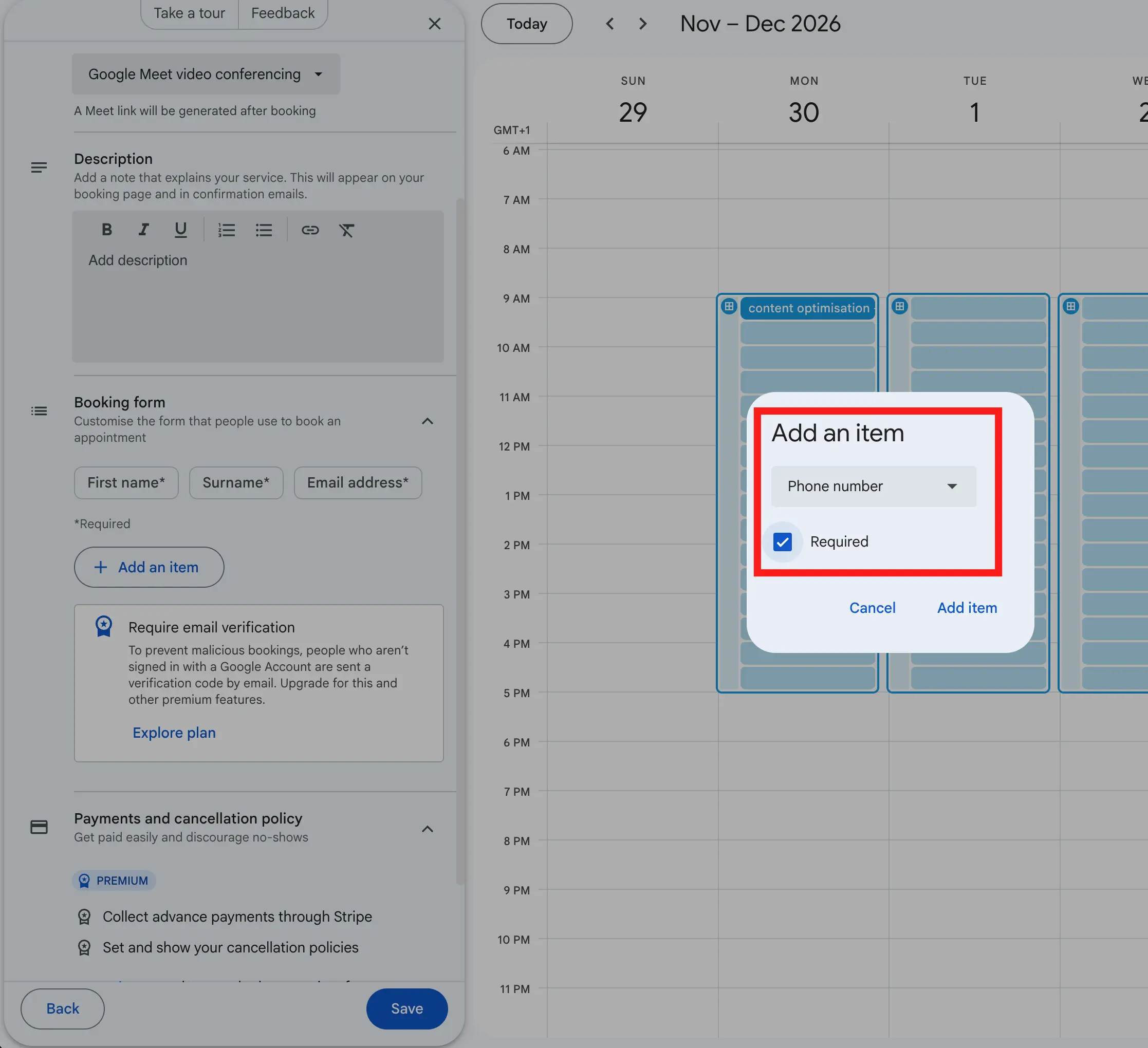
Go to Booking form and add a Phone number item.
Mark it as required, so nobody books without one.
Save.
Customers who book without a phone number still get their reminders by email, because the booking adds them to the event as a guest.
Step 2: Make sure bookings land in the calendar you connect
A booking page writes its bookings into the calendar the schedule belongs to. Remindlo's Google Calendar connection reads your main calendar, so the simplest setup is a booking page on your main calendar.
If your booking page lives on another calendar, add that calendar to Remindlo separately through its secret iCal address. See How to integrate SMS and email reminders into Google Calendar.
Step 3: Connect Google Calendar to Remindlo
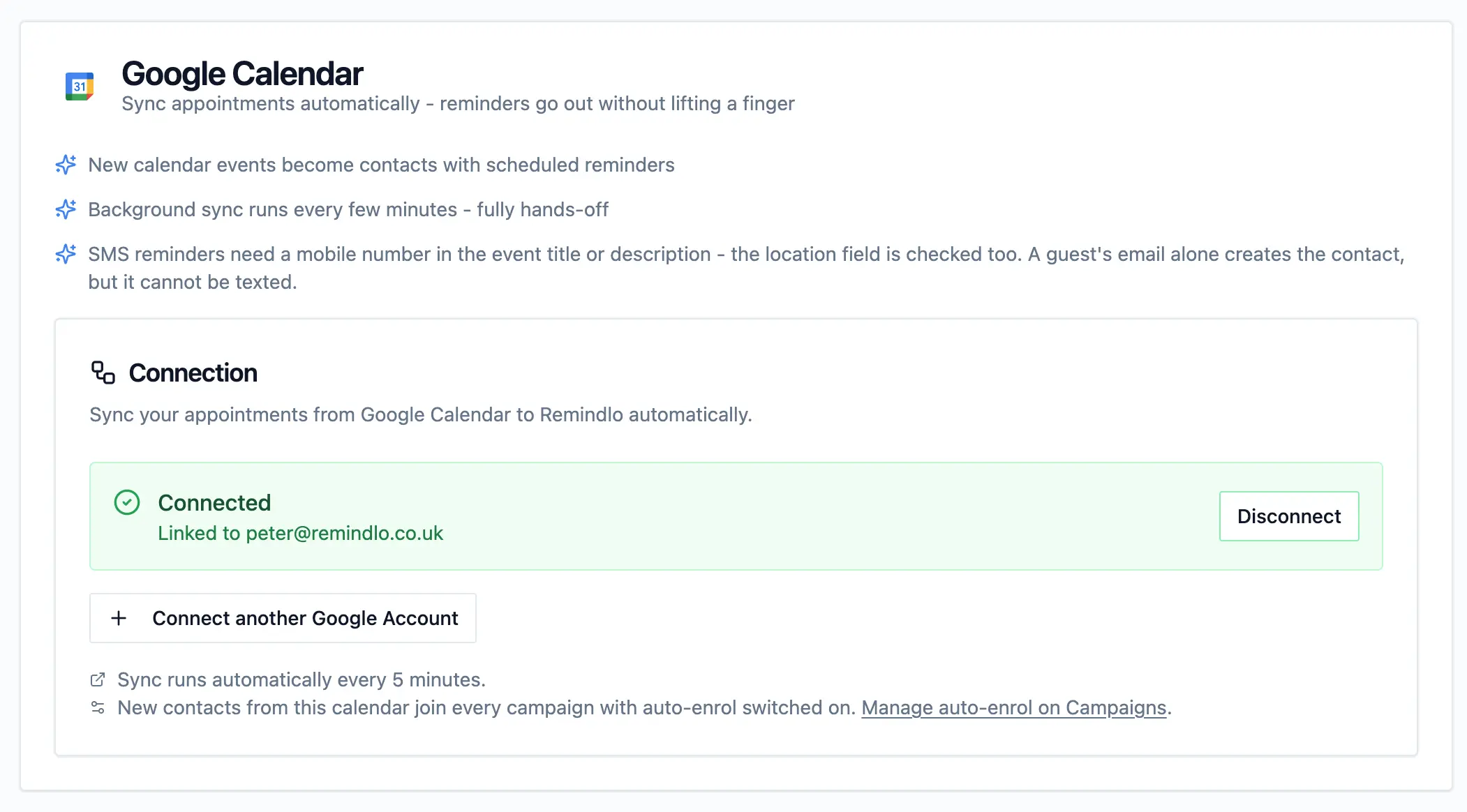
In Remindlo, open Integrations and connect Google Calendar. Remindlo checks for new bookings every few minutes, and appointments already in your calendar are picked up too.
Step 4: Set your default country code
Customers often type their number the way they would say it, without the country code: 07912 345678 rather than +44 7912 345678. Remindlo adds your Default country code to any number that has none.
Check it in Settings, under Account information. It was set when you created your account, so this is usually a quick look rather than a change.
Step 5: Switch on auto-enrol and make a test booking
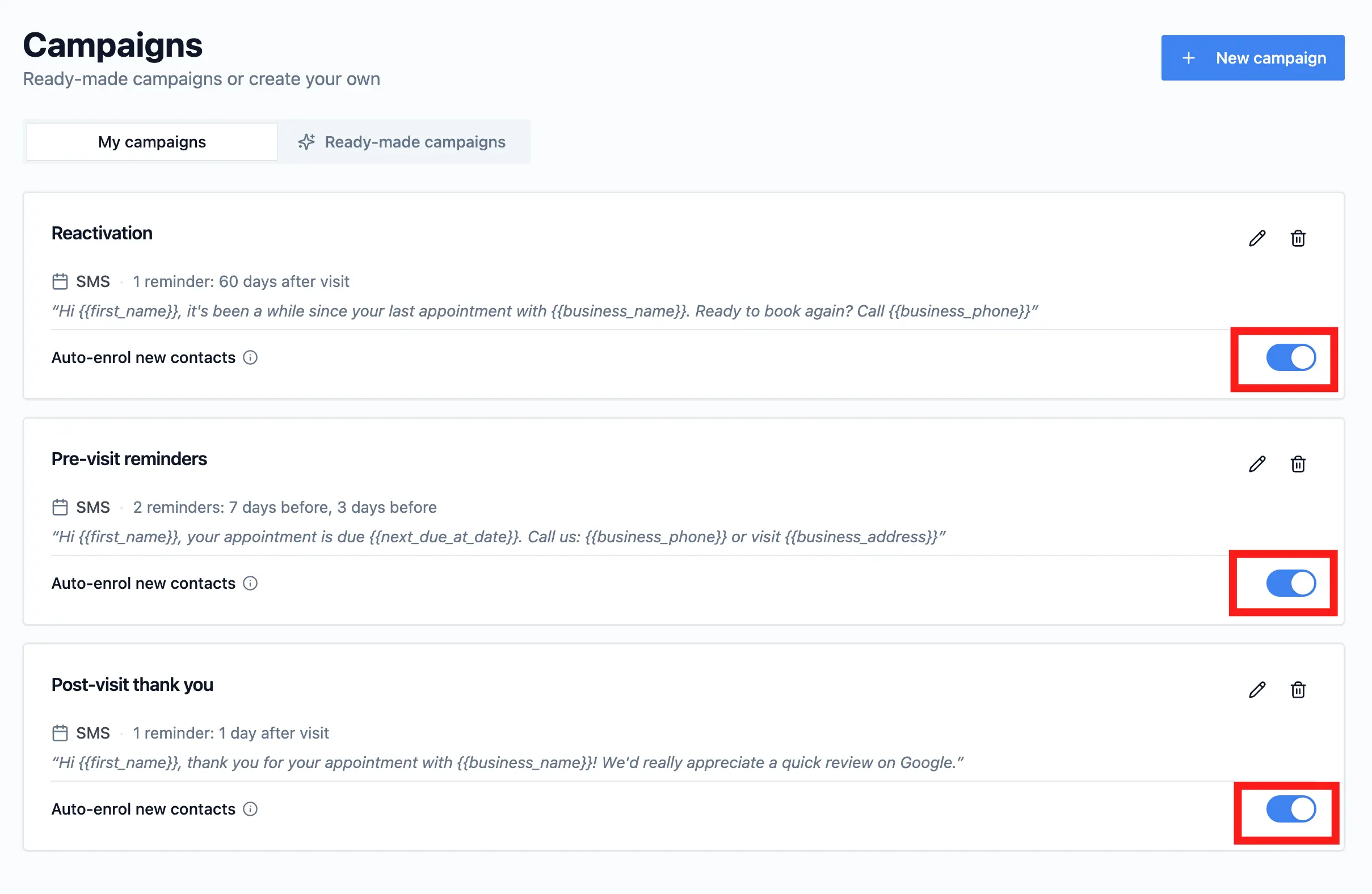
A booking becomes a contact on its own, but a contact only gets reminders from campaigns it has joined. New contacts join every campaign that has Auto-enrol new contacts switched on.
Open Campaigns and pick the reminder campaign you want bookings to get, usually the one that goes out before the visit.
Switch on Auto-enrol new contacts on that campaign, and check that SMS is one of its channels.
Book a slot on your own booking page a few days ahead, using your own mobile number.
Within a few minutes the booking should appear in Contacts with your name, your number and the visit date. Cancel the test booking afterwards and its reminders are removed with it.
What Remindlo reads from each booking
Google writes what the customer typed into the event description, under a heading such as "Booked by". Remindlo picks it up from there:
Name - the name the customer typed, not your schedule name. A page called "Haircut" sends "Hi Jane", never "Hi Haircut". This works whatever language your or your customer's Google account uses.
Phone number - from the phone field, with your default country code added when it is missing.
Email - from the customer's place on the guest list.
If your booking page offers Google Meet, the Meet dial-in numbers in the event are never mistaken for the customer's phone.
Each booking becomes a contact in Remindlo, with the appointment as their next visit, and your campaigns schedule the reminders from there. More detail: How Remindlo reads customer names and phone numbers from your calendar.
Cancellations and changes
Google's confirmation email gives the customer a link to cancel. When they use it, the event is cancelled in your calendar and Remindlo removes the reminders that were waiting for it. The same happens if you cancel or delete the event yourself, and if you move it, the reminders move with it.
If you want reminders to mention it, a line such as "Need to cancel? Use the link in your booking email or contact us directly at 020 7946 0000" should be enough.
Put your booking link in your messages
Your booking page can also bring customers back. Paste its link into Settings, Business details, Online Booking URL, and add {{business_booking_url}} to any template, for example your "time to book again" message:
Hi {{first_name}}, it's been a while since your last visit to {{business_name}}. Book online at {{business_booking_url}}
Use the short link
Remindlo puts the link into the text exactly as you pasted it, and every character counts towards the length of the SMS. Google gives your booking page two addresses:
The short link, starting
calendar.app.google/, which is under 40 characters. You get it from the Share button on the booking page. Use this one.The full address from your browser's address bar, starting
calendar.google.com/calendar/appointments/, which is well over 100 characters.
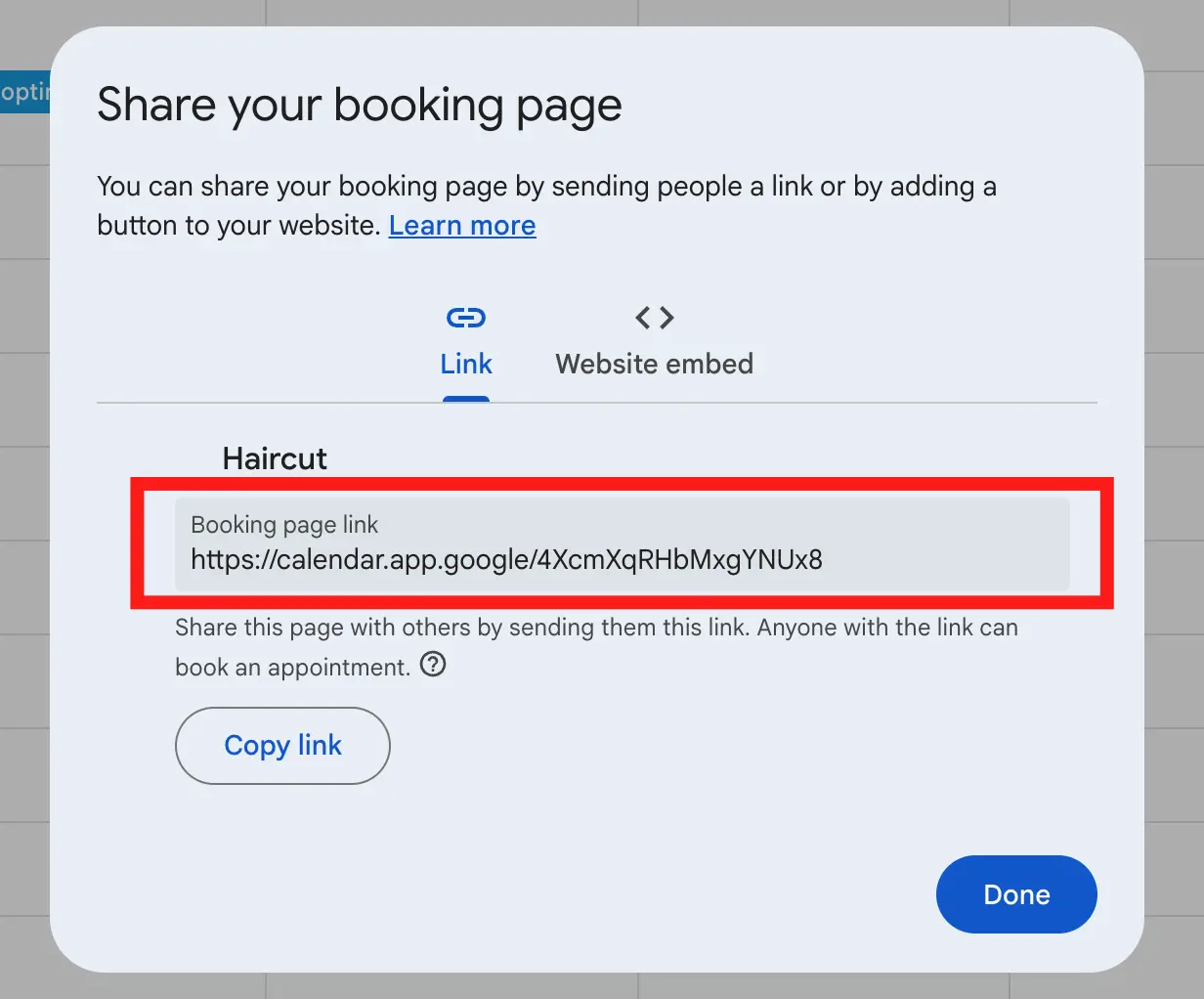
A standard SMS holds 160 characters, so the full address alone can push a reminder into a second SMS and double what every message costs. See How SMS usage is counted.
If you leave Online Booking URL empty, Remindlo leaves the link out, together with a short lead-in in front of it such as "Book online at" or "visit us at", so customers never get a sentence that ends in a blank. A longer lead-in stays, so keep it to one of those if the field might be empty.
Troubleshooting
A booking came through but nobody got a text
Open the contact in Remindlo. If there is no phone number, the customer left the field empty: make the phone field required on the booking form. If there is a number, open Campaigns and check two things on your reminder campaign: that Auto-enrol new contacts is switched on, and that SMS is one of its channels. Turning auto-enrol on is not retroactive: it covers every booking that arrives from then on, including new bookings from customers you already have, but a booking that came in while it was off does not join the campaign. See Step 5.
Bookings do not appear in Remindlo at all
The booking page is most likely writing to a calendar other than your main one. See Step 2.
The number was texted with the wrong country code
The customer typed a number without a country code, and your default country code is not theirs. Edit the number on the contact, and check the default in Settings.
The message used two SMS
Check which booking link you pasted into Online Booking URL. The full address is long enough to do it on its own; swap it for the short calendar.app.google link.
Frequently asked questions
Does this work on a free Google account?
Yes. Every personal Google account, free Gmail included, can create a booking page, and Remindlo reads its bookings the same way whichever Google plan you are on.
Do I need to change anything on my booking page for email reminders?
No. Every booking adds the customer as a guest with their email address, so email reminders work without a phone field.
Can customers cancel by replying to the text?
Not by reply: in the UK, reminders come from "Remindlo" as a sender rather than a phone number, so a reply has nowhere to go. Point them to the cancel link in their Google booking email instead, and Remindlo will remove the reminders when they use it.
Related: Calendly SMS reminders, Acuity Scheduling SMS reminders, Cal.com SMS reminders.