Reorder Reminders for Online Shops: How to Turn One-Time Buyers Into Repeat Customers
Contents
- What a reorder reminder is - and what it is not
- The maths: what a missed reorder costs
- Which online categories have predictable cycles
- How to set this up without writing code
- The one genuinely fiddly part: turning a product into a cycle
- Reorder messages that work
- When to send
- Consent and the UK rules
- Should this be a text or an email?
- Common mistakes
- Frequently asked questions
- From dispatch notification to second order
- Getting started
Quick answer
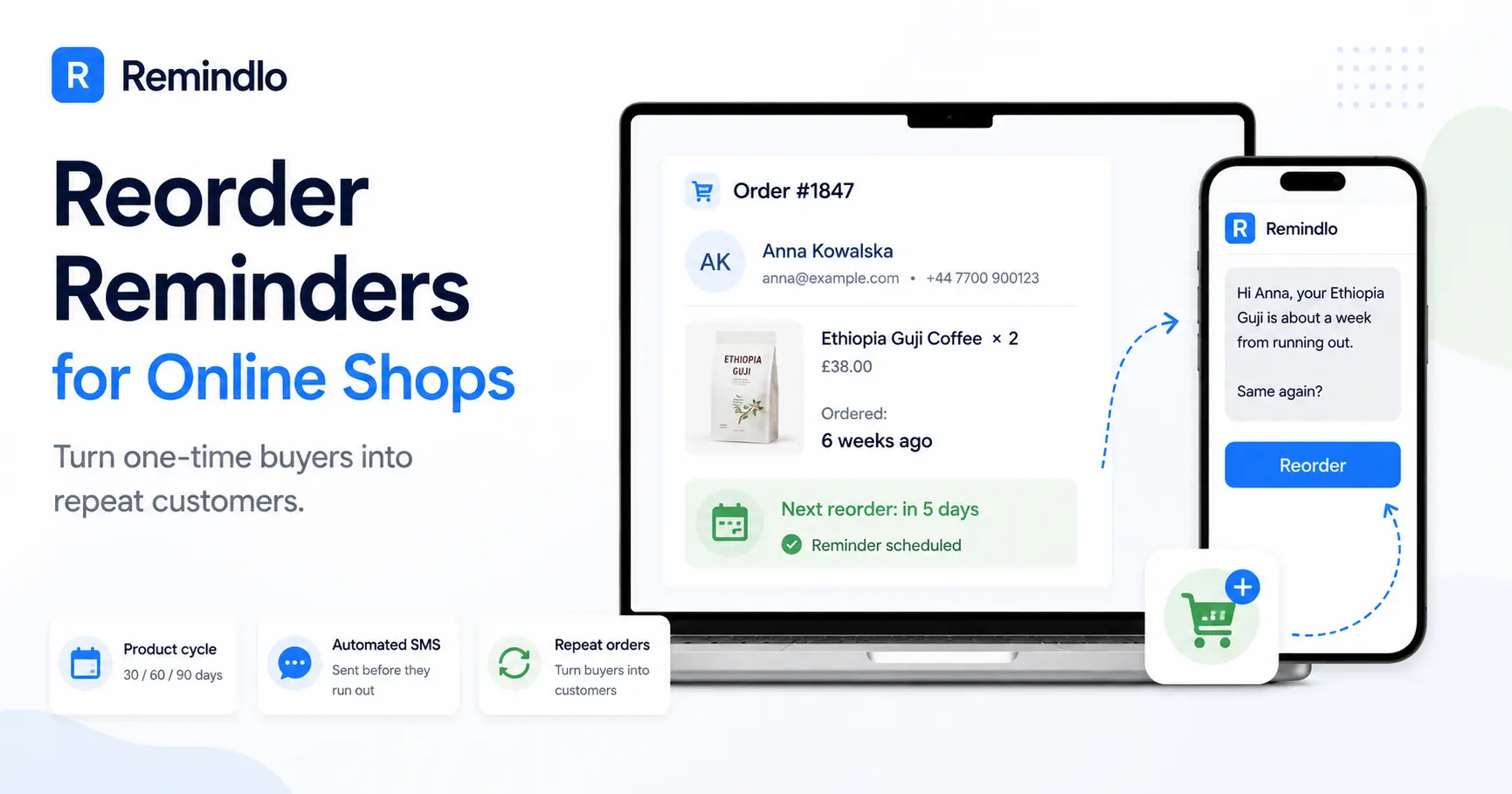
A reorder reminder is an automated text sent to one customer when the item they bought is about to run out, timed from their order date minus the delivery window. Online shops already hold the order date, the item and the contact, so setting one up is mapping fields you already have.
A shop with a counter has one hard problem when it starts sending replacement reminders: getting the purchase written down. Somebody has to ask for the mobile number, record what was sold, and work out when it is due - fifteen seconds of work at the till that is very easy to skip on a busy Saturday.
An online shop has the opposite problem. The purchase is already recorded. The order date, the exact items, the customer's name, their email, often their mobile number - all of it is sitting in the admin panel the moment the order is placed, in a structured form, with no handwriting to decipher. And in most shops none of it is ever used again after the dispatch notification.
That is the whole opportunity in one sentence: online shops have already done the hard part of a reorder reminder system and then stop one step short of using it.
What a reorder reminder is - and what it is not
A reorder reminder is an automated message tied to one customer and one thing they already bought, timed to the point where they are about to run out. Three things separate it from the other messages an online shop sends:
It is not an abandoned cart message. Abandoned cart catches someone who was already halfway to buying, minutes ago. A reorder reminder reaches someone who bought successfully, was happy, and has since forgotten you exist.
It is not a campaign. Nobody else gets it that day. It goes out because that customer's 60-capsule tub was bought 54 days ago, not because it is payday or the start of a sale.
It is useful before it is commercial. You are telling someone something they would want to know regardless of who they buy from. That is why it reads differently from a discount code, and why it keeps working after the novelty of a promotion has worn off.
It is the same mechanism a garage uses for MOT dates and a vet uses for vaccinations, applied to a repeat purchase. Remindlo supports both shapes: recurring reminders for anything on a repeating cycle, where the next date rolls forward automatically once one passes, and periodic reminders for a one-off future date such as a warranty expiry.
The maths: what a missed reorder costs
The argument is easier to see with numbers than with adjectives. Take a shop selling roasted coffee. These figures are an illustration - put your own in:
Figure | Example |
|---|---|
First-time buyers per year | 1,200 |
Average order value | £38 |
Typical consumption cycle | 6 weeks |
Buyers who reorder unprompted | 25% |
Buyers who reorder after a reminder | 38% |
Extra second orders per year | 156 x £38 = £5,928 |
Messages needed | About 100 a month |
A 13 percentage point swing is not an aggressive assumption. It is the difference between the customer remembering your shop unaided six weeks later and the customer typing the product category into Google, where whoever is bidding hardest gets the order.
And that table understates it, because it only counts the second order. A coffee customer on a six-week cycle who keeps buying places roughly eight orders a year. The reminder is not worth £38 once - it is what decides whether a £38 customer becomes a £300 customer. This is the same compounding effect behind product life cycles and predictable revenue; online shops simply have more cycles running at once and better records of them.
Which online categories have predictable cycles
Not everything you sell is worth tracking. The test is one question: can you predict, at the moment of the order, roughly when this customer will need more? If the answer is yes to within a week or two, it belongs in a reminder campaign. If you are guessing, leave it out - a mistimed reminder is worse than none.
1. Coffee, tea and consumable food
A 250g bag of coffee is a fortnight for one household and five days for another, but the second order tells you which. Once a customer has ordered twice, the gap between those two orders is the most reliable cycle estimate you will ever get, and it costs nothing to calculate.
2. Supplements and vitamins
The best category to start with, because the cycle is printed on the product. A 60-capsule tub taken twice daily is 30 days. There is no estimating involved, the customer already agrees with the maths, and a reminder that says "you are about a week from the end of your tub" is simply true.
3. Skincare and cosmetics
Serums, cleansers and creams run 6 to 12 weeks depending on size. Slightly softer than supplements, but the routine is habitual, and running out mid-routine is exactly the moment a customer will buy whatever is fastest to arrive.
4. Pet food and treatments
Food monthly, flea and worming every 1 to 3 months, dental chews on a similar rhythm. Pet owners want to be consistent and simply lose track. Using the pet's name turns the message from an advert into a reminder:
Max is due his flea treatment this week - your usual is one tap away.
The same logic drives vaccination reminders in veterinary practices, which is why pet retail usually shows results fastest.
5. Contact lenses and eye care
Dailies, fortnightlies and monthlies are cycles with the frequency in the product name. Running out is genuinely disruptive, which makes this one of the few categories where customers are actively grateful for the text.
6. Filters and cartridges
Water filter cartridges every 4 to 8 weeks, air purifier filters every 6 to 12 months, vacuum HEPA filters every 6 to 12 months, cooker hood filters every 3 to 6 months. Manufacturers publish these intervals, so you are quoting a specification rather than inventing a sales reason.
7. Razor blades, brush heads and oral care
Replacement heads and blades have manufacturer intervals that almost nobody keeps to, precisely because there is no prompt. Low value per order, but very high frequency and near-zero decision-making once the reminder lands.
8. Printer consumables and office supplies
Cartridges and toner run on usage you can estimate from the gap between a customer's previous orders. For trade accounts this stops being a reminder and starts being light account management, which is often what converts an occasional buyer into a standing order.
One category to be careful with: anything where the cycle changes as you go. Nappies and baby formula look like perfect candidates until you realise the size and quantity shift every few months, and a reminder for the wrong size reads as carelessness.
How to set this up without writing code
You need three things in Remindlo: a mobile number, a name, and a date the customer will next need the product. Your shop already holds the first two and can calculate the third. The job is moving them across automatically, and there are three ways to do it depending on where you are starting.
Option A: Zapier, for a live shop (no code)
This is the route most shops should take. Zapier connects to Shopify, WooCommerce, Squarespace Commerce and several thousand other apps, and Remindlo is a Zapier app, so the whole flow is built by choosing from dropdowns.
The Zap has three steps:
Trigger: New Order in your shop. Fires within seconds of checkout and carries the customer's details and the line items.
Formatter: work out the due date. This is the one step that needs a moment's thought, and it gets its own section below.
Action: Find or Create Contact in Remindlo. Use Find or Create rather than Create - repeat buyers must update the existing contact rather than spawn a duplicate. Map the phone number, the first name, the due date you calculated, and set the contact as recurrent with the interval. From then on the date rolls forward on its own after each cycle.
Map the consent field too, and map it from your shop's own SMS consent field - not from the fact that an order exists. An order proves someone bought from you; it does not prove they agreed to be texted. Set it only where the customer actually opted in, or where every soft opt-in condition in the consent section below is met. A new Remindlo contact starts with no consent, so leaving it unmapped fails safe rather than quietly building a list you cannot use.
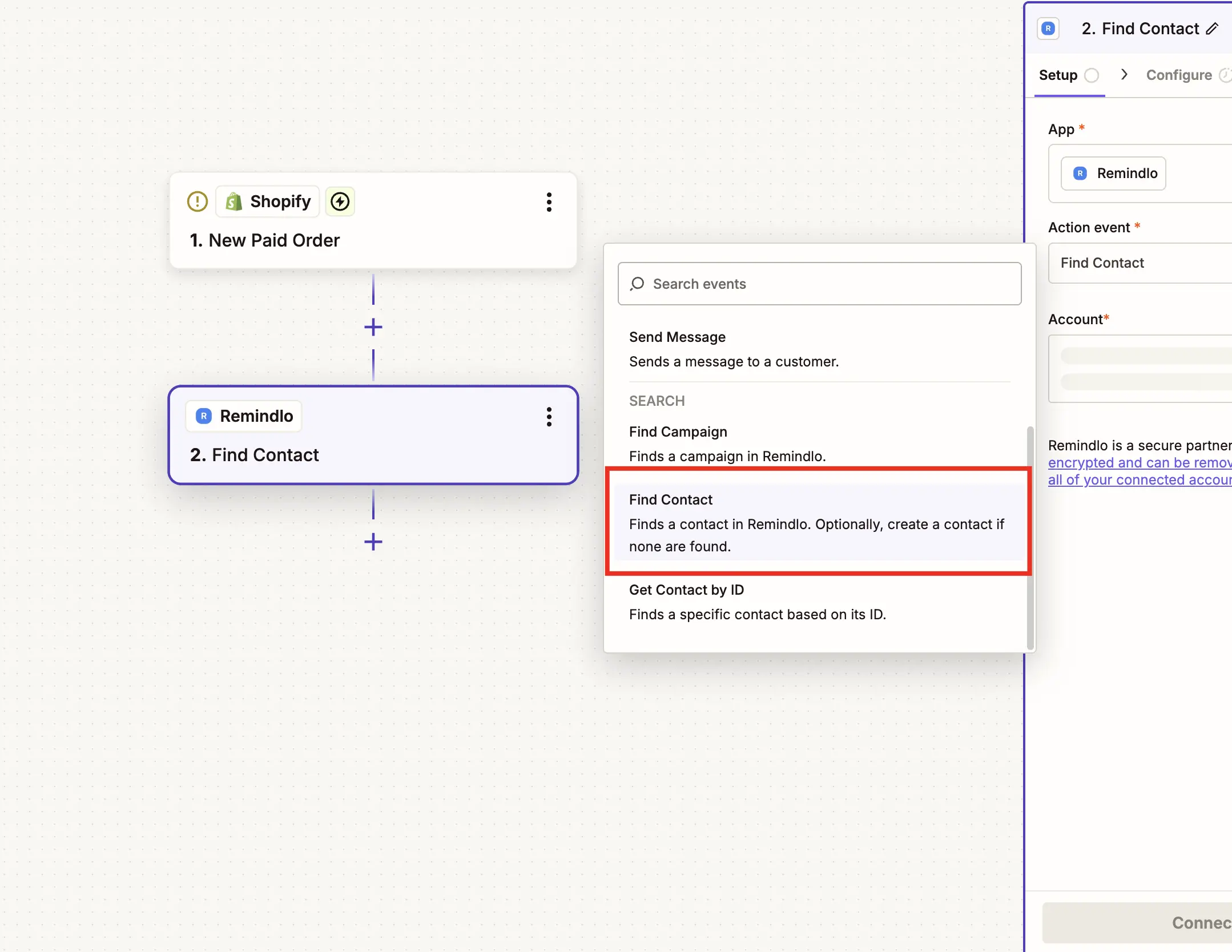
That is the entire build. No developer, no app to install on your store, and you can have it running in an afternoon.
Option B: a spreadsheet, for testing the idea first
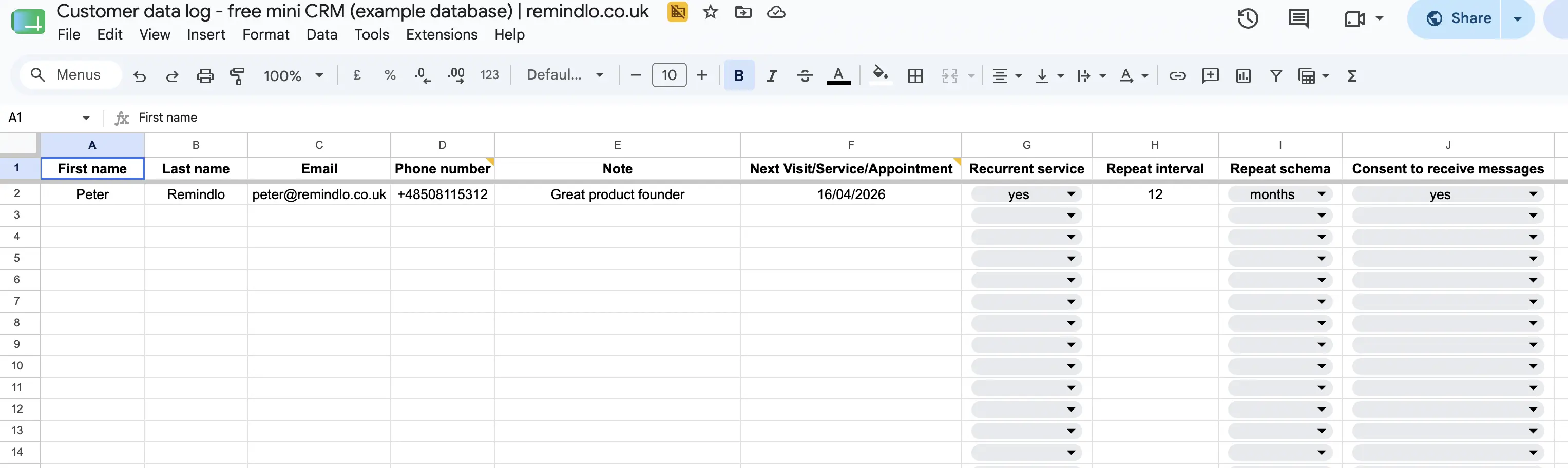
If you want to prove reminders work before automating anything, export your last few months of orders to a spreadsheet, add a due-date column, and send reminders straight from Google Sheets. It is manual, it does not scale, and it will answer the only question that matters - do your customers reorder when reminded - within about six weeks.
Option C: the API, if you have a developer
A single call to the contacts endpoint from your order-confirmation handler does the same job as the Zap, with full control over how the due date is calculated. Worth it once your product-to-cycle logic is more complicated than a lookup table can express. Pass marketing_consent from whatever your checkout actually recorded rather than hard-coding it to true - the field defaults to false, and setting it stamps the date it was given, which is the evidence you want if anyone ever asks. Webhooks push events back the other way if you want reminder activity in your own reporting.
The one genuinely fiddly part: turning a product into a cycle
Your shop knows what was ordered. It does not know how long that lasts. Bridging the two is where most reorder projects stall, so decide which of these three you are doing before you build anything.
1. One cycle for the whole shop. If almost everything you sell lasts about the same time - a coffee roaster, a supplement brand with one flagship product - use a single interval and move on. This is not a compromise worth agonising over; it is right often enough to be worth shipping today.
2. A lookup table. Zapier's Formatter includes a lookup step: give it the product or SKU from the order, and it returns the number of days. Ten rows covers most catalogues, because most shops have a handful of cycle lengths rather than one per product. Add rows as you add ranges.
3. The pack size. The strongest option where it applies. If the product states a dose or a duration - 60 capsules, 30 days, 3 months of blades - the cycle is not your estimate, it is the manufacturer's. Reminders built this way are the easiest to write, because you are quoting the label back to the person who read it.
Whichever you pick, subtract the delivery time. This is the single biggest difference between reminding a shop customer and reminding an online one. Someone standing in a shop can act on a reminder immediately; your customer has to wait for a courier. A reminder that lands the day the tub runs out has already lost, because the gap is what sends them to a shelf or a marketplace. Work backwards: cycle length, minus delivery time, minus a few days for them to get round to it.
Reorder messages that work
Reorder texts fail for predictable reasons - too long, too vague, or too obviously a promotion. A good one names the item, names the timing, gives one clear action, and signs off with the shop name so the customer knows who is texting.
Coffee, 6-week cycle:
Hi Anna, your Ethiopia Guji is about a week from running out. Same again? redcliffecoffee.co.uk/reorder - Redcliffe Coffee
Supplements, 30-day tub:
Hi Tom, you are about 5 days from the end of your magnesium. Order today and it lands before you run out. Northfield Supplements
Pet treatment, 3-month cycle:
Hi Sam, Max is due his flea treatment next week. Your usual is saved - reorder in two taps. Headingley Pet Supplies
Contact lenses, monthly:
Hi Claire, your monthlies run out around the 28th. Want the same box? Reply or order online. Otley Optical
Water filter, 8-week cycle:
Hi John, your filter cartridge is due for a change this week. We have your size - delivery is 2 days. Bramley Home Store
Two practical notes. Watch the length: a plain-text message runs to 160 characters before it is charged as two, and a single emoji or curly quote drops that limit to 70. And put the shop name in every message - after six weeks, an unsigned text from an unknown number reads as a scam, which is how a useful reminder becomes an opt-out. The free SMS template generator will draft variants for your own products if you want a starting point.
When to send
Send too early and it gets filed away and forgotten. Send too late and they have already bought elsewhere. The rule: land the message while the customer still has some left, with enough time for delivery.
Product | Cycle | Send the reminder |
|---|---|---|
Coffee or tea | 2 to 6 weeks | 5 to 7 days before they run out |
Supplements | 30 to 90 days | At 85% of the pack duration |
Skincare | 6 to 12 weeks | 1 week before due |
Pet food | Monthly | 4 to 5 days before the bag ends |
Flea or worming treatment | 1 to 3 months | 3 to 4 days before due |
Contact lenses | Daily to monthly packs | 1 week before the pack ends |
Water filter cartridge | 4 to 8 weeks | 4 to 5 days before due |
Printer cartridge | Usage-based | At 80% of that customer's own interval |
Two rules that matter as much as the schedule:
Respect the hours. Nothing before 8am or after 9pm. Remindlo holds messages inside quiet hours automatically, but if you are sending by hand, watch the clock - and remember an online customer base may not all be in the same time zone as you.
One reminder, not three. For a consumable, a single well-timed message is enough. Chasing someone who did not reply is how a useful reminder turns into spam, and it is the fastest route to an opt-out you cannot undo.
Consent and the UK rules
Texting customers is governed in the UK by PECR alongside UK GDPR. Online shops sit in a reasonable position here, but there is one mistake that is much easier to make online than in a shop, so read the fourth point carefully.
Soft opt-in applies to your own customers. If someone bought from you, was given a chance to opt out when you took the number, and you are messaging about similar products, you can contact them without separate written consent. A reminder that the thing they bought is running out is the textbook case.
Ask for the number with a reason. A checkout field labelled "mobile (optional)" collects far fewer numbers than one that says what it is for. "Want a text when this is due for reordering? Just the reminder, nothing else" gets a better opt-in rate and sets an expectation you can actually keep.
Record SMS consent separately from email consent. They are different permissions and most platforms track them separately for good reason. Do not infer one from the other.
Do not repurpose delivery numbers. This is the specific trap online. A phone number given so a courier can find the house was not given for marketing, and treating your dispatch data as a marketing list is the fastest way to a complaint. If you did not ask, ask before you send.
Every message needs a way out that works. UK messages sent from a business name rather than a number are one-way - the reply has nowhere to go. If your sender is a name, tell people how to actually reach you. Remindlo's messaging policy covers both cases.
Keep the reminder a reminder. The further the message drifts from the product the customer already owns, the closer it gets to marketing that needs full consent.
For the detail, including what to record and how long to keep it, see SMS compliance and UK GDPR.
Should this be a text or an email?
Honest answer: run the email flow too, and do not send both for the same reorder.
Email is close to free, so a replenishment email is worth sending even at a low open rate. The trouble is that it lands in an inbox already holding forty other messages, and a reorder prompt is time-sensitive in a way that survives about one day of being ignored.
A text costs real money per message, so it has to earn its place. It does that in three situations: when running out is disruptive (lenses, medication-adjacent products, pet treatments), when the order value comfortably covers the cost, or when the customer is not an email opener - which is a larger group than most shops assume, and one where SMS does markedly better.
A sensible split for most shops: email for everything, text for your highest-value or most time-critical cycles. Start with one category, measure it, and expand only where the arithmetic works.
Common mistakes
Building the whole catalogue first. Pick one product line with a short cycle, run it for two months, then expand. Supplements and pet treatments beat filters as a first test purely because you learn faster.
Using Create Contact instead of Find or Create. The classic Zap bug: every repeat order spawns a duplicate contact, and the customer starts getting two reminders. Catch this on day one.
Sending on a schedule rather than per customer. A message that goes to everyone on the 1st of the month is a promotion, and it will be read as one no matter how it is worded.
Forgetting delivery time. The most common online-specific error, and the one that quietly halves your results.
Ignoring everyone who already lapsed. Your existing order history is full of people who bought once and were never contacted again. They are the cheapest audience you will ever have - a reactivation campaign against that back catalogue is usually the fastest first win, and it costs one export - filtered the same way as any other import, because an old back catalogue is exactly where opted-out and delivery-only numbers are hiding.
Frequently asked questions
Do I need a Shopify app to do this?
No. Remindlo connects through Zapier, which already integrates with Shopify, WooCommerce, Squarespace Commerce and most other platforms, so the connection is built from dropdowns rather than installed. You can also use a spreadsheet or the API. Etsy is the notable exception - it has no Zapier app of its own, so an Etsy shop needs the spreadsheet route or a developer.
How do I know a customer's cycle if they have only ordered once?
Use the pack size or the manufacturer's stated interval for the first cycle. After the second order you have something better - the actual gap between their orders - and you can correct the interval to match.
Is it legal to text customers in the UK about reordering?
Generally yes under the PECR soft opt-in, provided they bought from you, were offered a way to opt out when you collected the number, and the message relates to a similar product. The number must have been collected for contact rather than solely for delivery, and every message needs a working opt-out route.
What if they already reordered somewhere else?
Then the reminder cost you a few pence and told you something useful. Keep the tone light so a mistimed message is easy to ignore, and update the interval when a customer tells you their cycle is different.
Will this annoy customers?
Only if you send more than the product justifies. One message per genuine cycle is a service; a second chasing message about the same purchase is marketing, and that is the one that gets you an opt-out.
How much does this cost to run?
A shop tracking a few hundred customers usually sends between 50 and 150 messages a month. Remindlo's free plan includes 10 SMS a month, which is enough to test the flow on real customers before paying for anything.
Does this work alongside Klaviyo or my existing email tool?
Yes, and it should. Keep your email flows where they are and use texts for the cycles where the timing genuinely matters. The one rule is not to send both messages for the same reorder - pick a channel per cycle.
From dispatch notification to second order
Most online shops treat the dispatch email as the end of the relationship. Everything after that is left to memory, and memory is exactly what fails - not because the customer was unhappy, but because six weeks is long enough to forget a shop and short enough that the need is still real.
The order data to fix this is already in your admin panel. It has a date, an item and a contact on it, and it is doing nothing. Turning it into a reminder is an afternoon of setup and a few pence per message, and it moves the moment of the next order from "whenever they happen to remember" to a point you chose.
That is the same shift that retail shops make at the till and trades make with annual services. Online shops just start with better records - and, oddly, are the least likely to use them. Your customer list is the one asset no platform can take away from you; the reorder reminder is what makes it earn.
Getting started
Pick your single best category - the one with the shortest, most predictable cycle.
Export the last six months of orders for it and work out a due date for each customer.
Filter that export before it goes anywhere near a send. Remove anyone who has opted out, and remove every number you hold only because a courier needed it. What should survive is the rows where all three soft opt-in conditions hold: you took the number during the sale itself, the reminder is for a similar product, and the customer was given a simple way to refuse when you collected it. Keep the filtered-out rows and the reason in the same file - if a complaint ever arrives, that file is your answer, and it takes minutes now versus reconstructing it a year later.
Import what survived into Remindlo, mark the contacts as recurrent with the interval, and let the first batch of reminders go out.
If they reorder, build the Zap so it happens automatically from then on. If they do not, you have spent about £15 finding out - which is cheaper than the year you would otherwise spend assuming it would have worked.
Create a free Remindlo account and set up your first reorder campaign - the free plan covers the test.